

Werkstatt, plugins and Marktplatz
Wishes that people submit are built by AI agents – first only for the person (or sub-account) who wished for them, then, if they prove good, for everyone.
Wunsch ──► Werkstatt ──► private plugin ──► Sub-Account ──► Agentur-weit ──► Marktplatz ──► core feature (wish) plan, consent, only the author one sub-account all sub-accounts install per "im Kern approval, build sees it (team) (admin) sub-account enthalten"- Werkstatt (
/app/werkstatt) is where a wish is built: Bauen lassen on a wish (or in the done screen of “Neuer Wunsch”) makes the AI propose a plan, the requester confirms it, the build runs with a log, cost tracking and a monthly budget per sub-account. - Marktplatz (
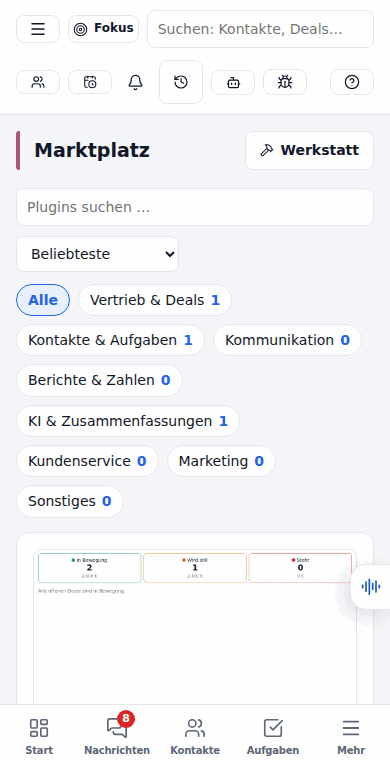
/app/marktplatz) is where plugins are discovered and installed – with categories, search, screenshots, ratings, install counts, consent screens, updates and uninstall. - Plugins are small apps that run in a sandbox: a menu page, a panel on the contact/deal page, a dashboard widget, a workflow action or a scheduled job.
Both names live in one constant, server/services/werkstatt/names.ts; rename
them there and the server messages and the web app follow. The UI is German; this page is English.
- Screenshots
- Architecture
- Policy, approval and budget
- Model gate and Denkstufe
- Sicherheitsnetz
- In the agent chat
- License: AGPL core and Pro
- Security model
- Writing a plugin by hand
- Marktplatz
- Stage 3: core features and feature flags
- MCP tools and the agent
- Configuration
- Live smoke test
- So testest du die Werkstatt (German tester guide)
Screenshots
Section titled “Screenshots”| Light | Dark | Phone | |
|---|---|---|---|
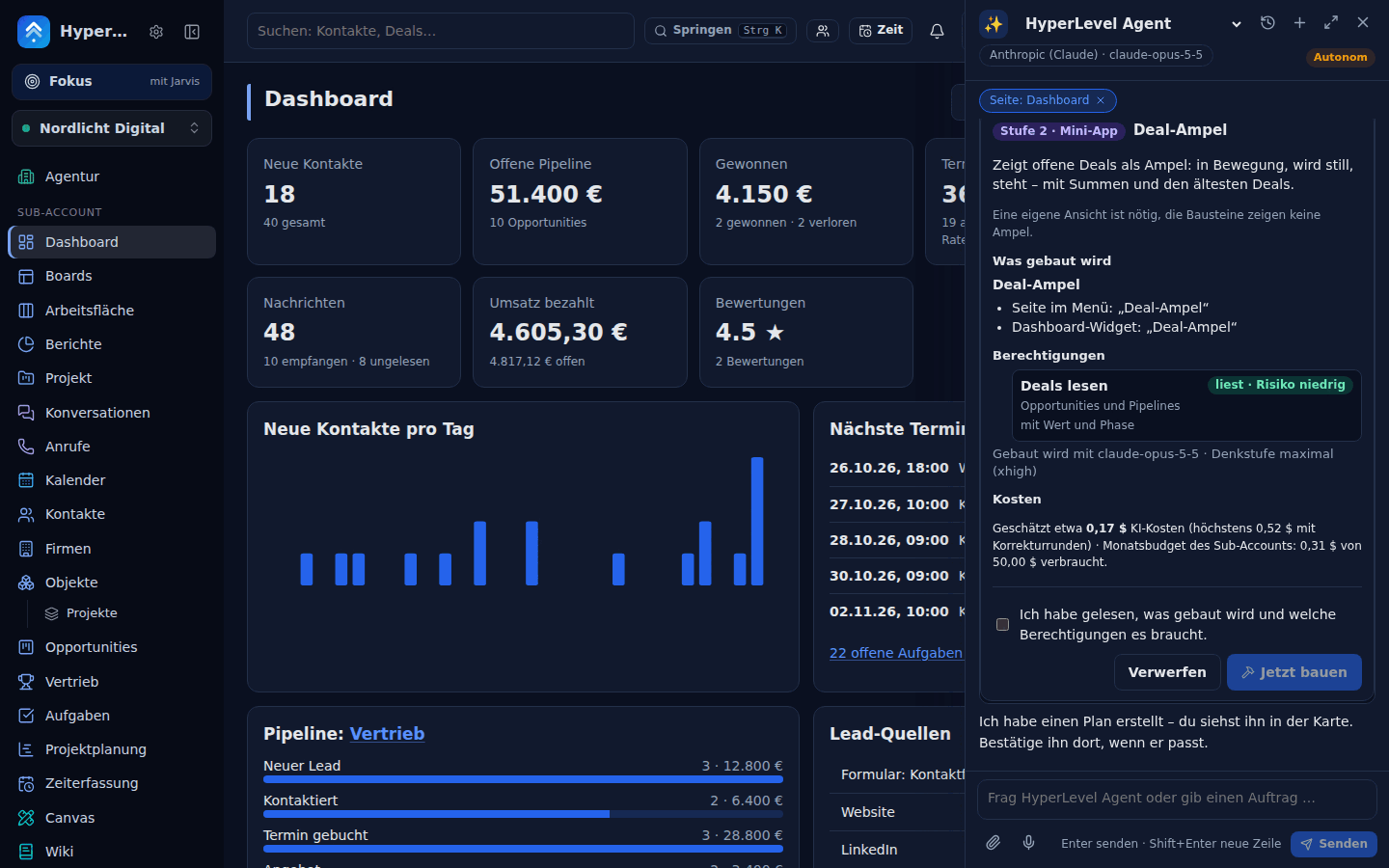
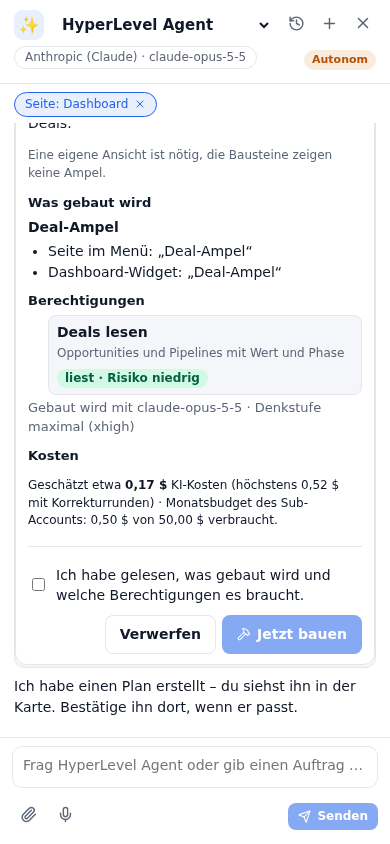
| The build plan (what gets created, permissions, cost) | 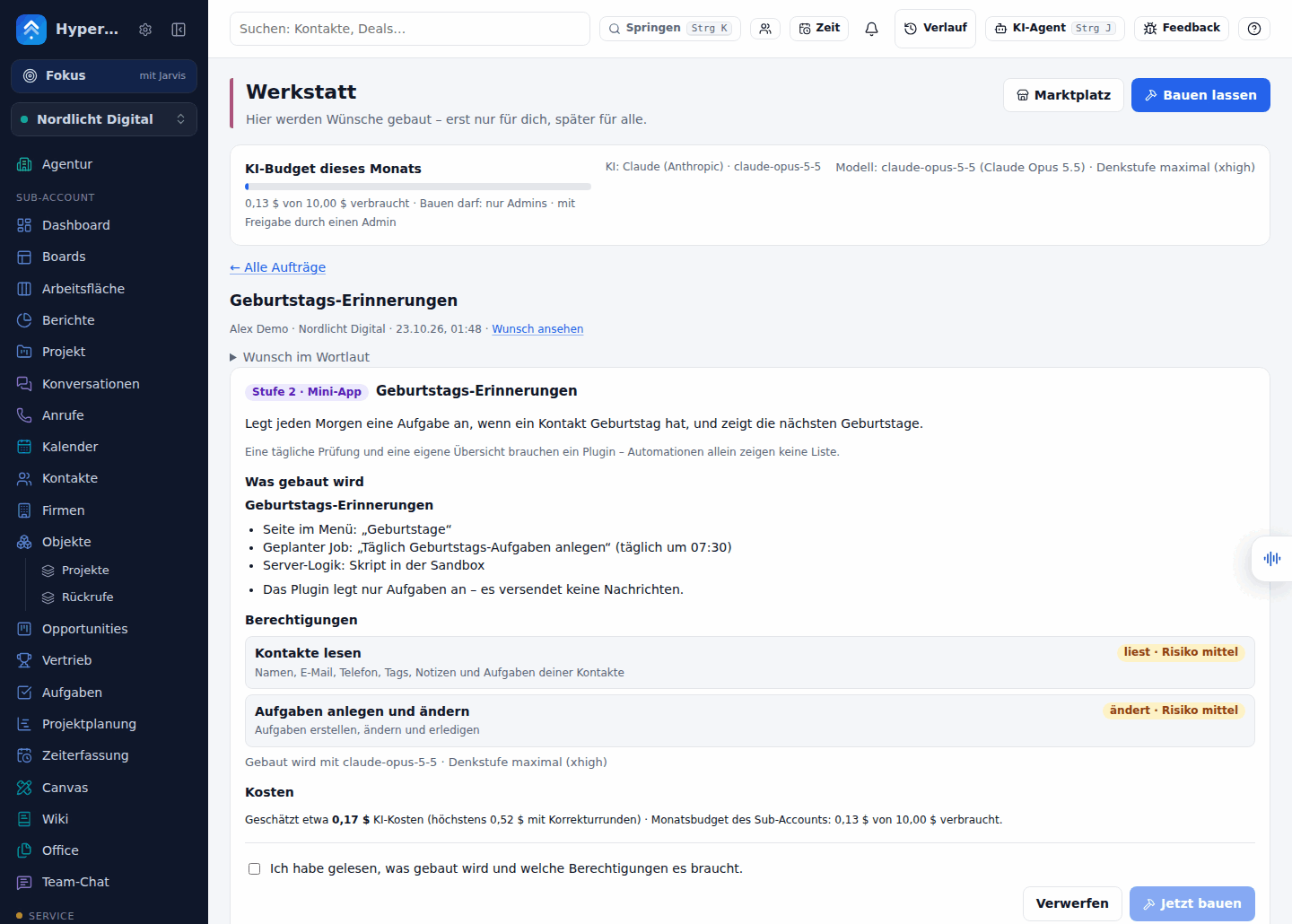 |
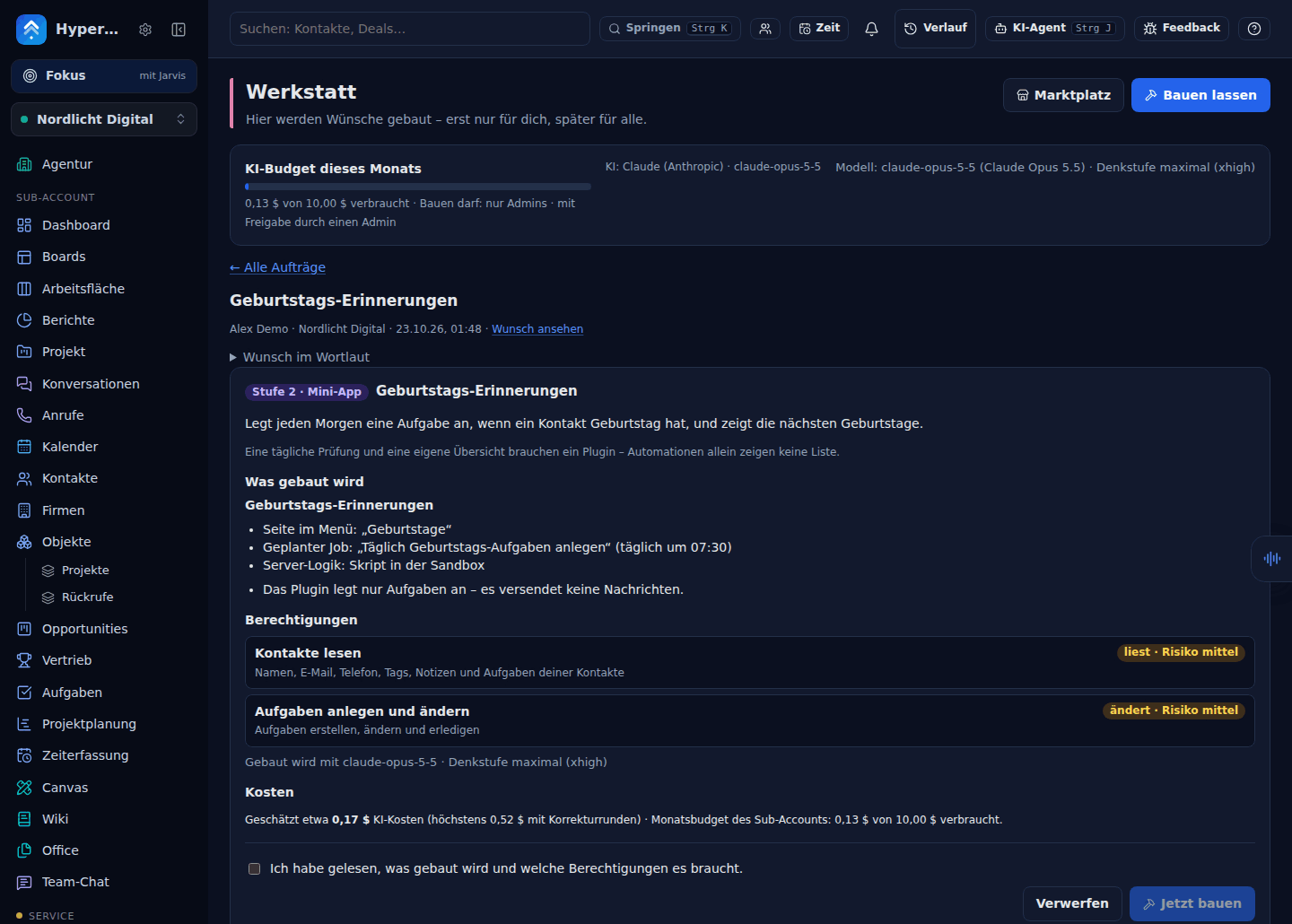 |
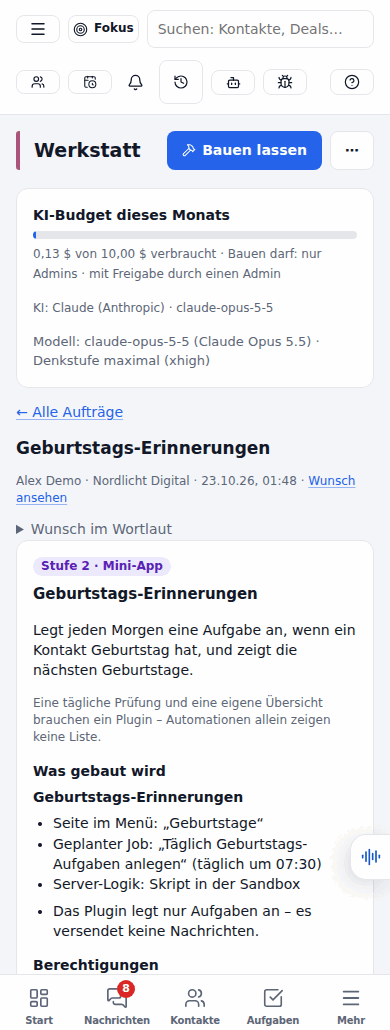 |
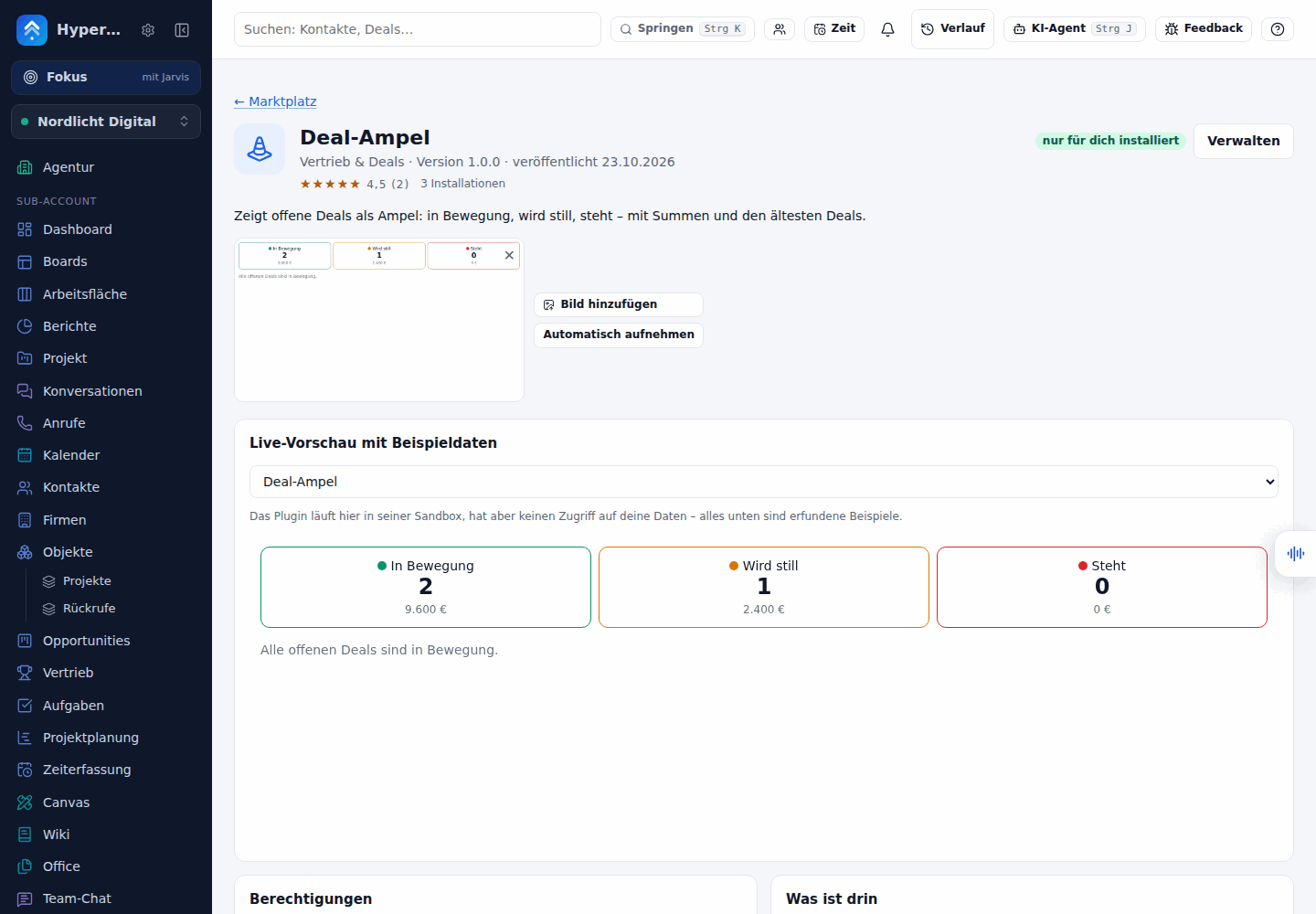
| A running plugin (Deal-Ampel, sandboxed iframe) | 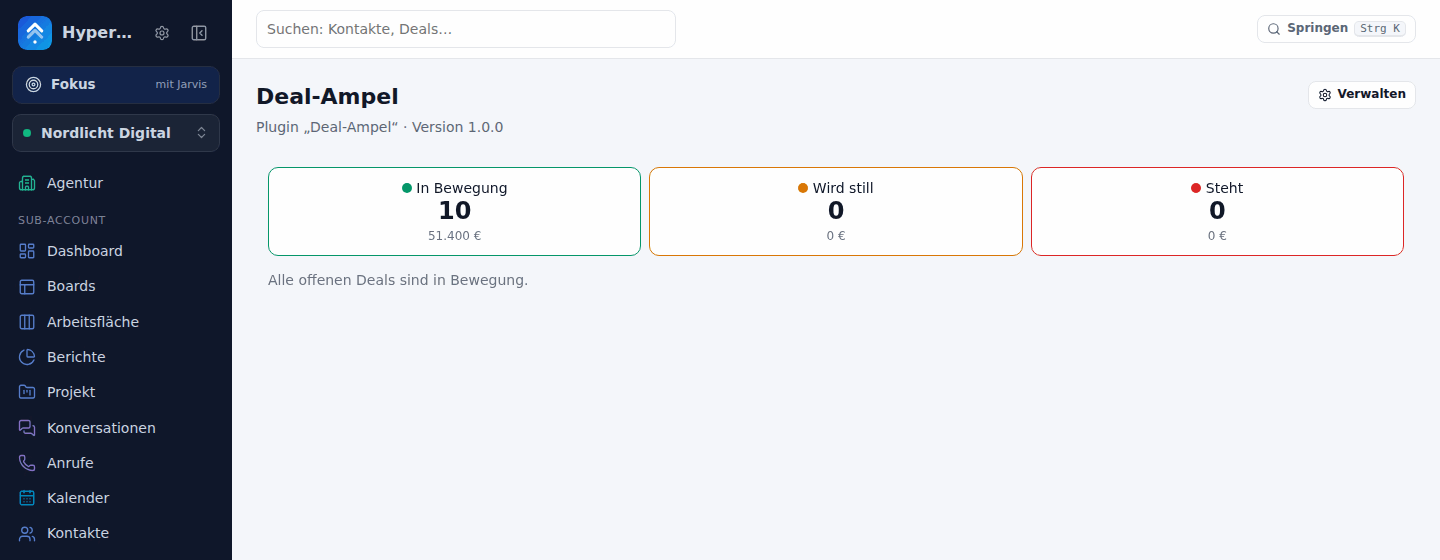 |
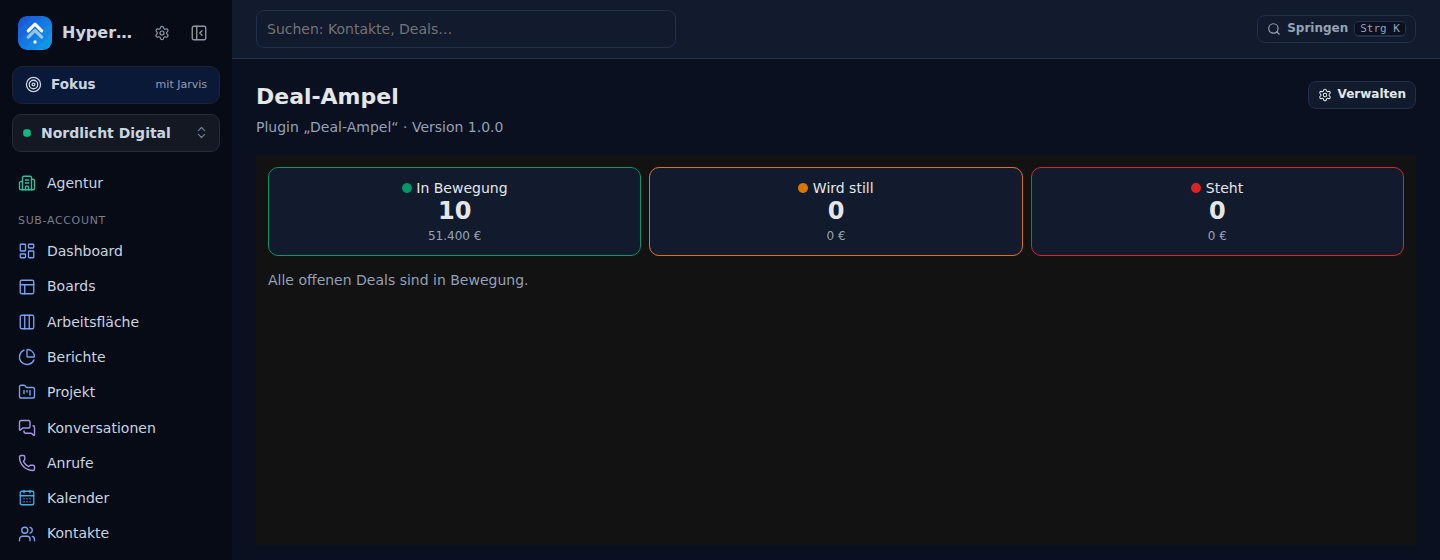 |
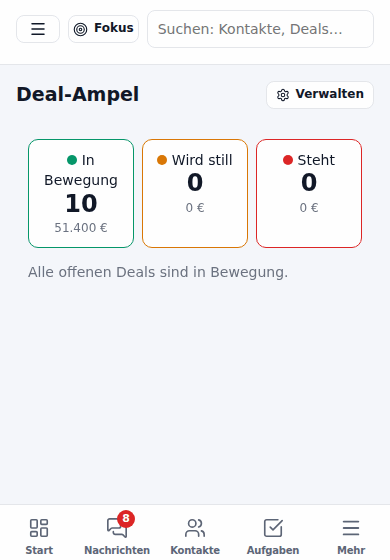 |
| The Marktplatz | 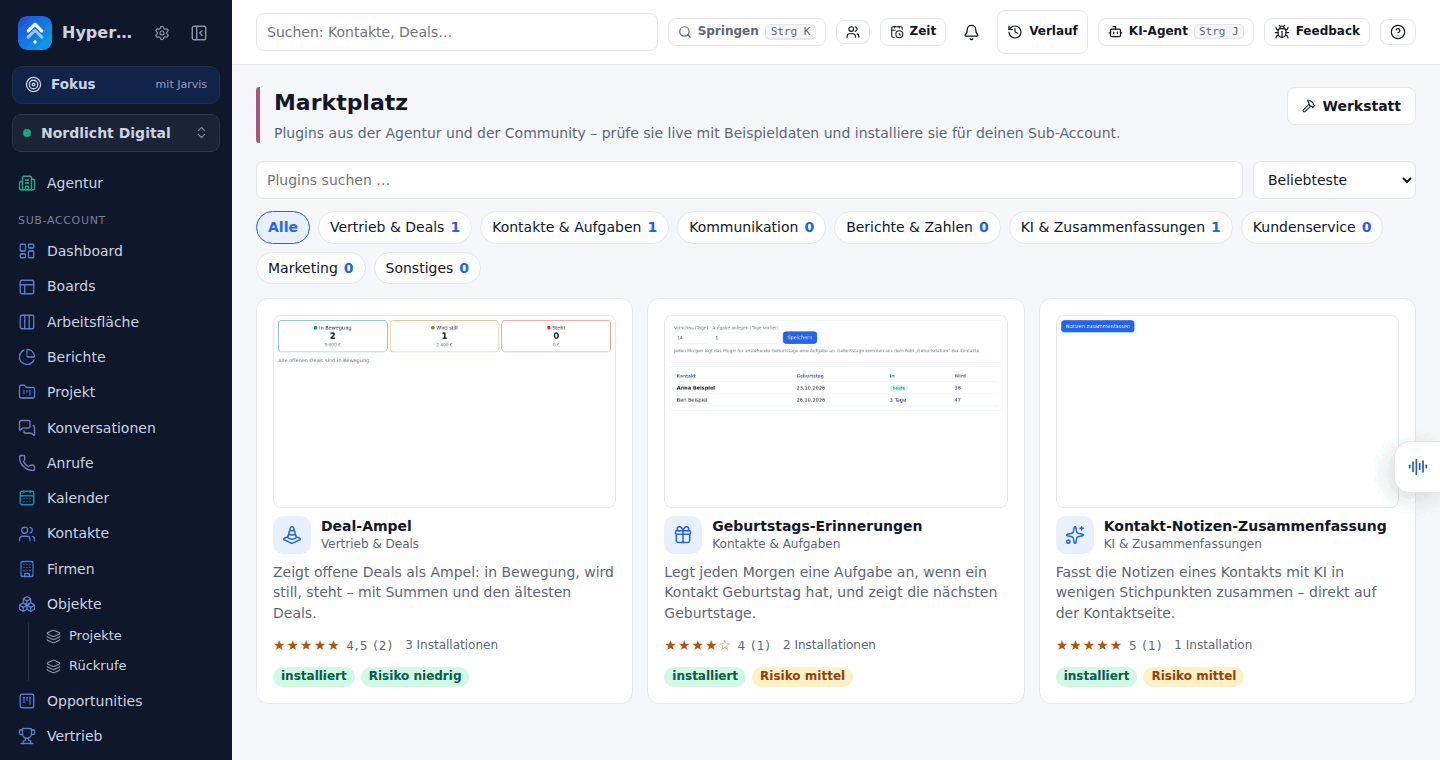 |
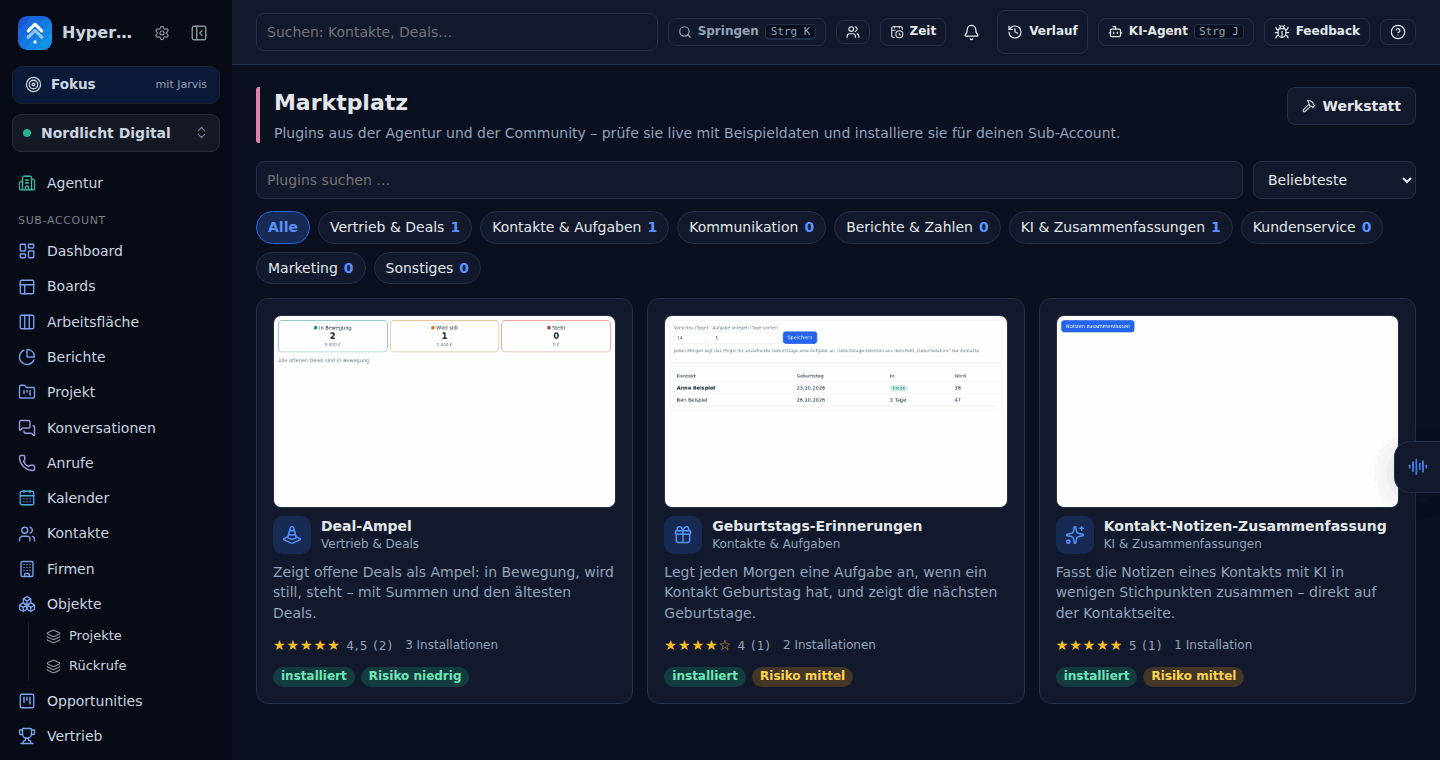 |
 |
The Sicherheitsnetz and the agent chat (made by scripts/werkstatt-safety-screenshots.ts, scripted AI, fictional demo data):
| Light | Dark | Phone | |
|---|---|---|---|
| Agent chat: the plan as a card, confirmed with the person’s own button | 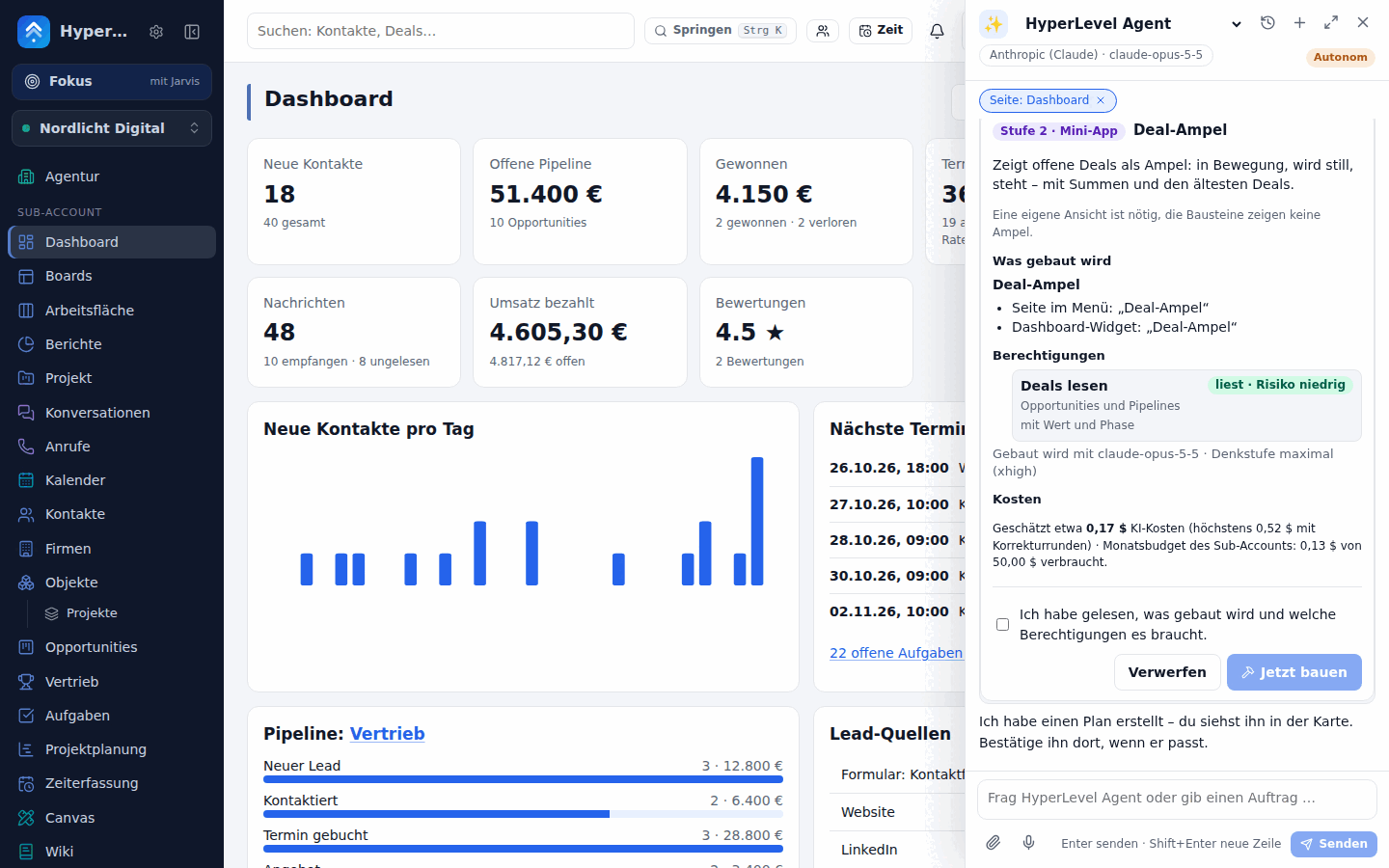 |
 |
 |
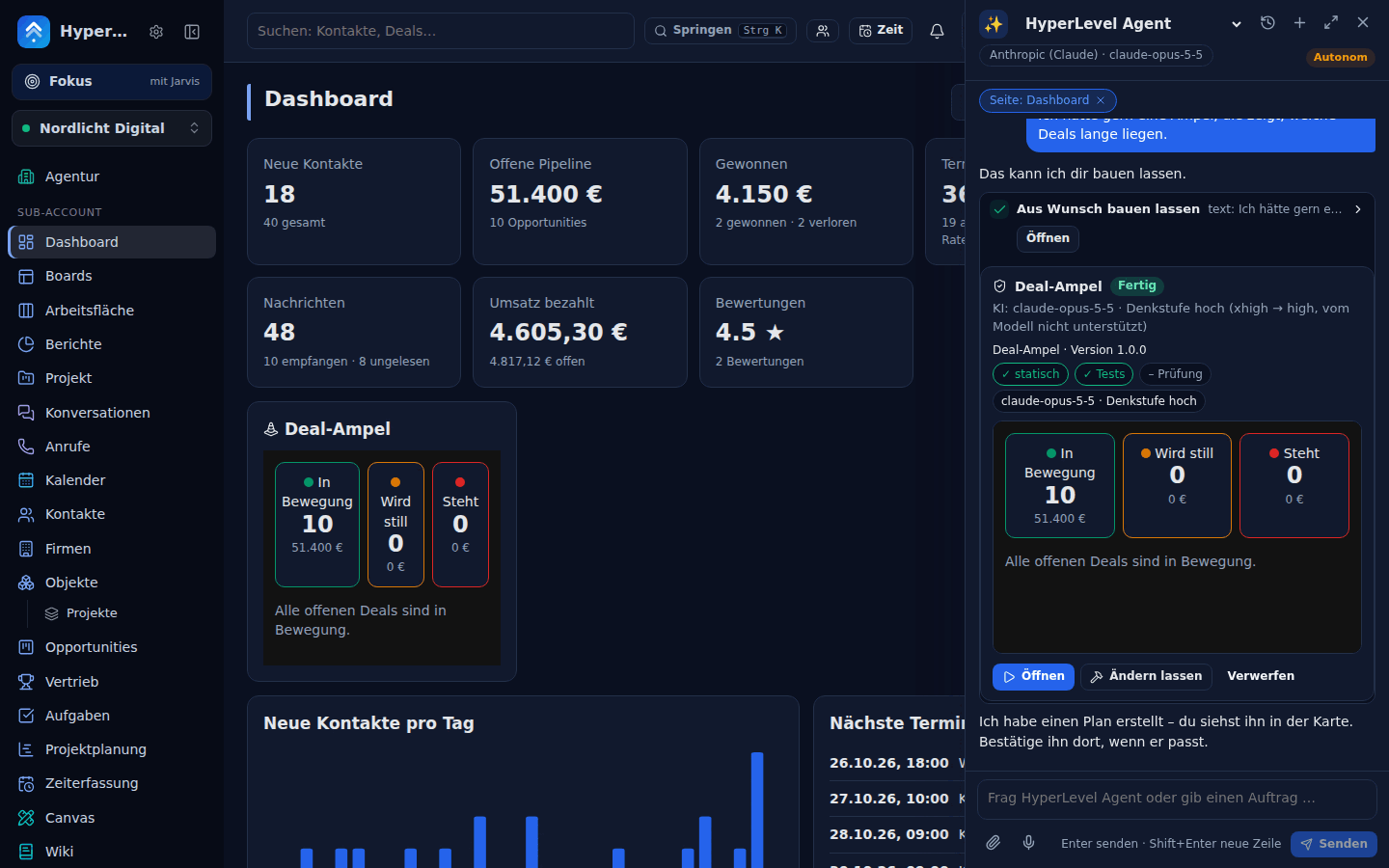
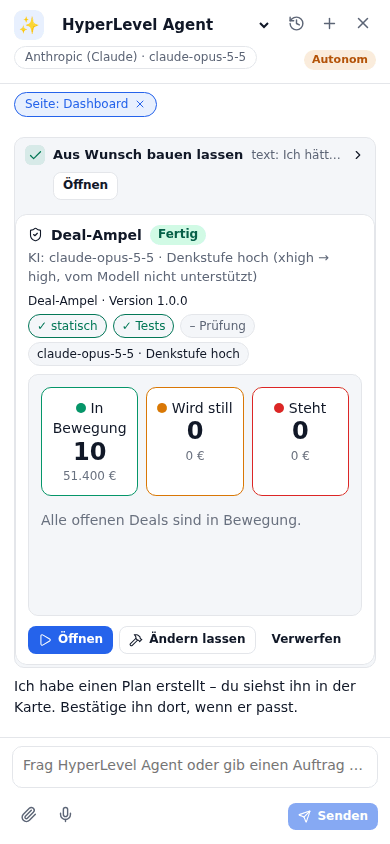
| Agent chat: finished, with the sandboxed preview, Öffnen / Ändern lassen / Verwerfen | 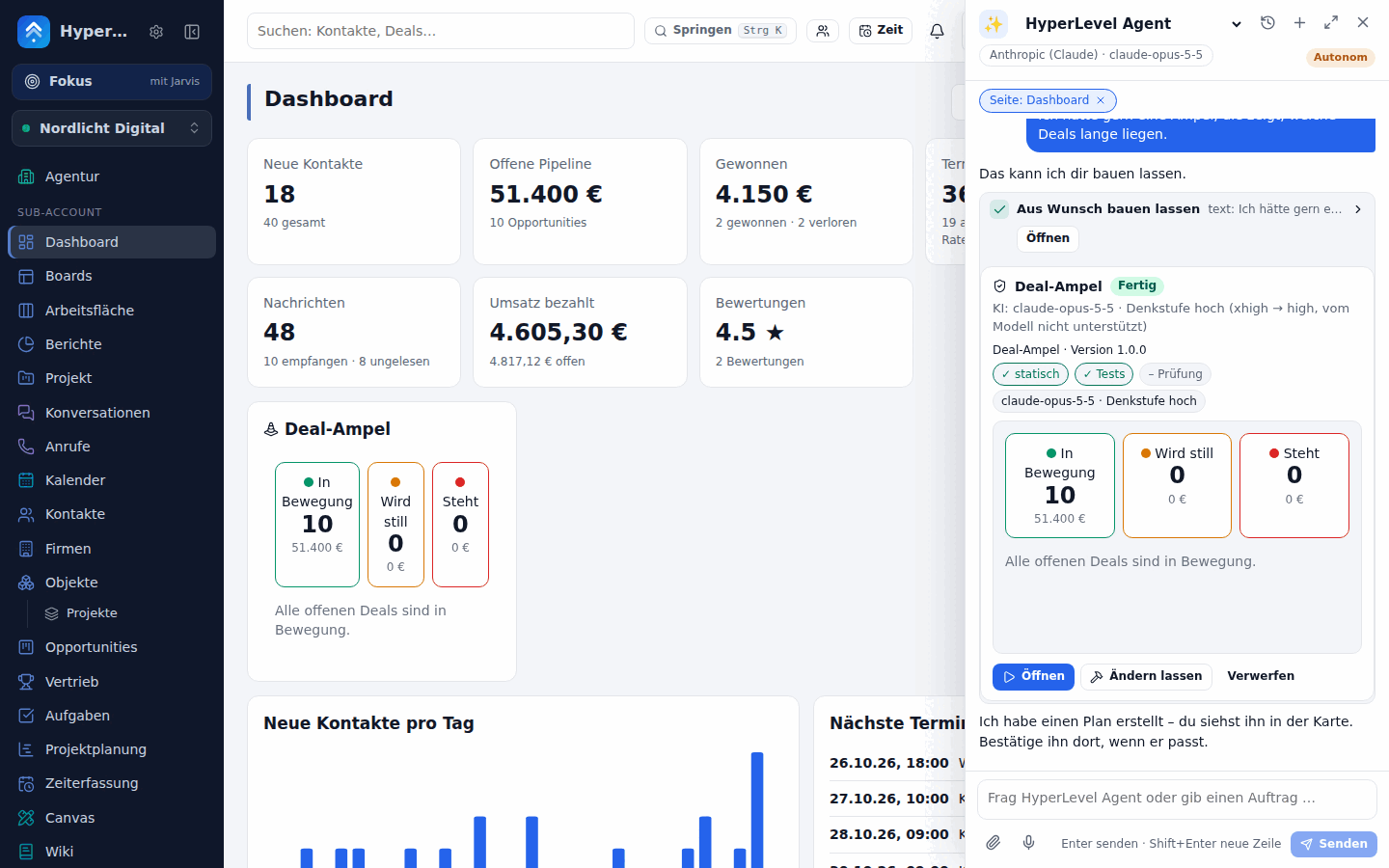 |
 |
 |
| Agent chat: “mach die Karten kräftiger” → version 2 with the diff summary | 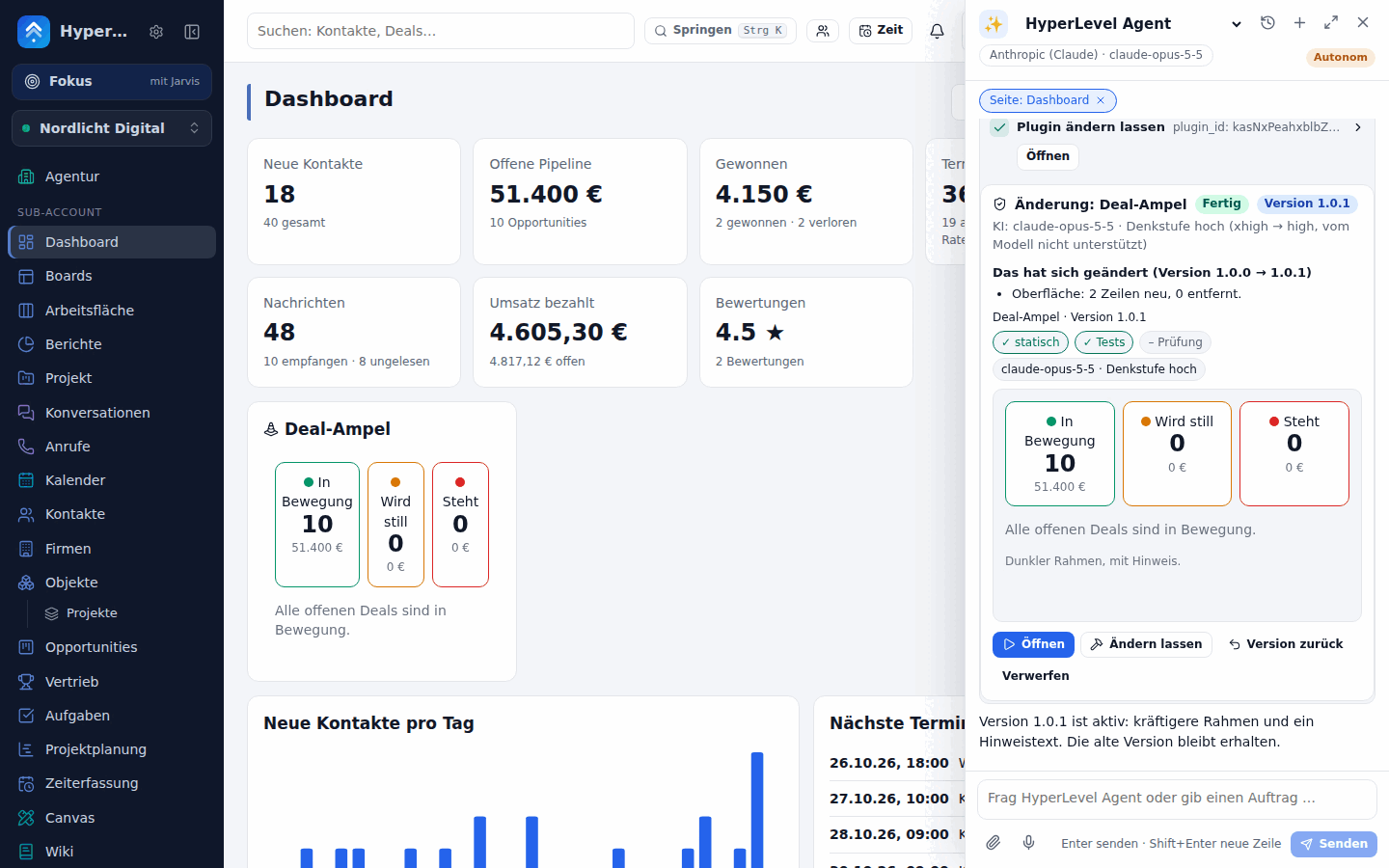 |
 |
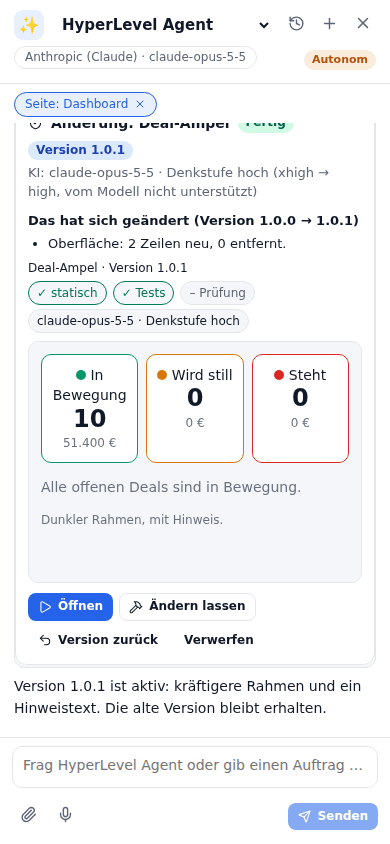 |
| Publish dialog: review and second opinion side by side | 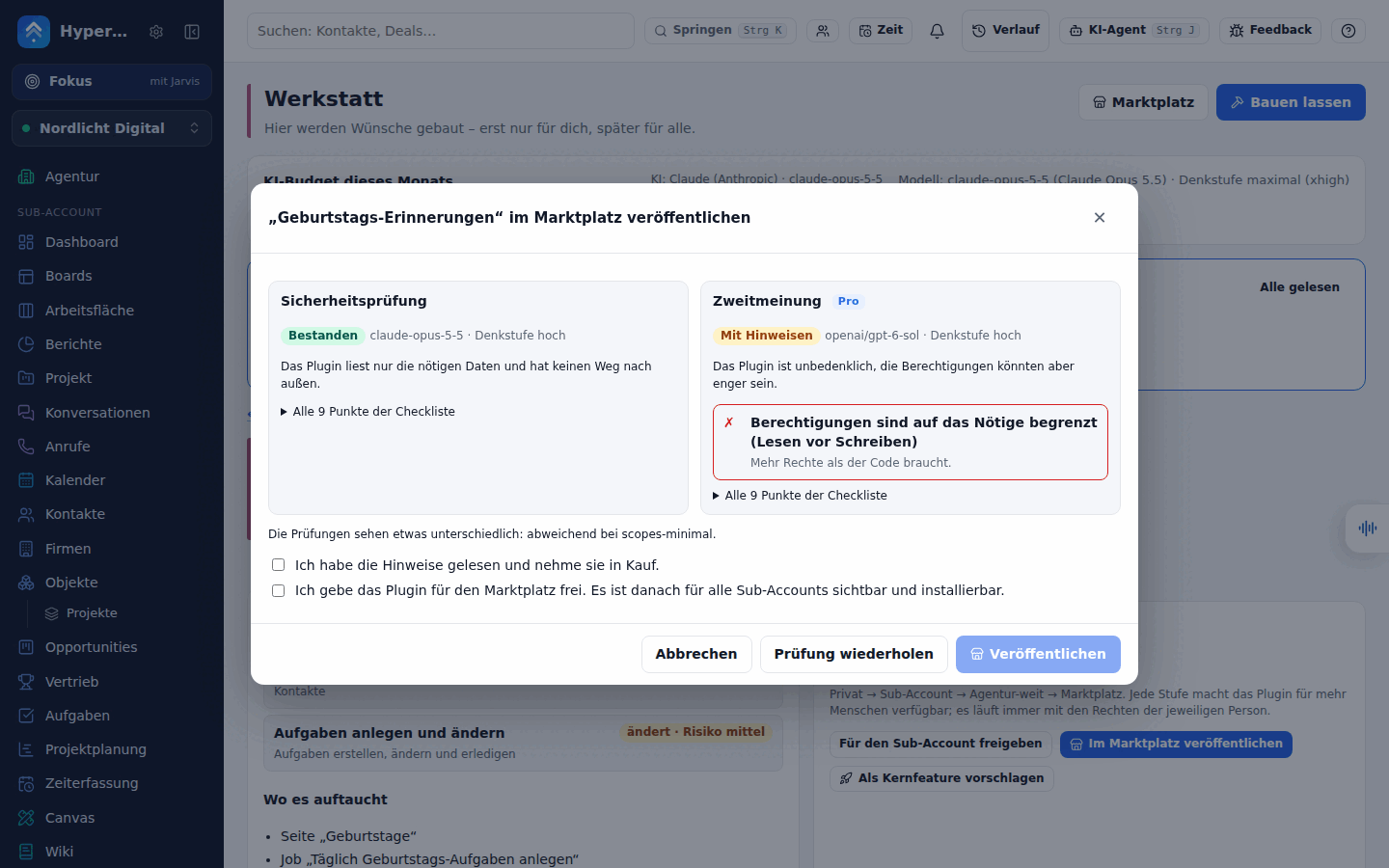 |
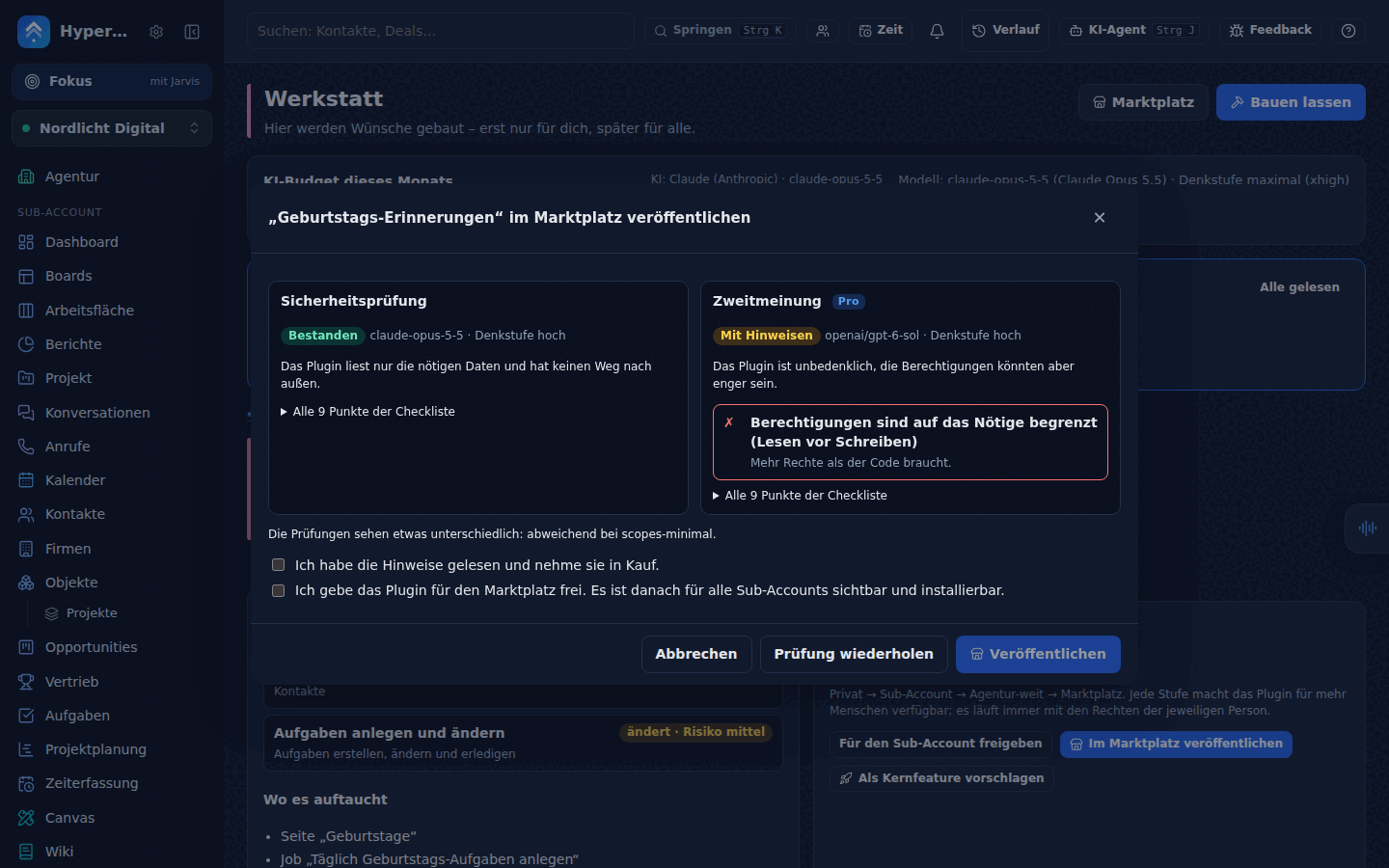 |
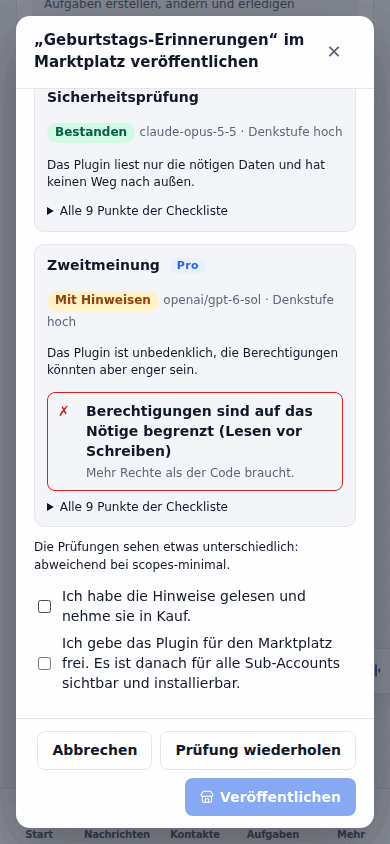 |
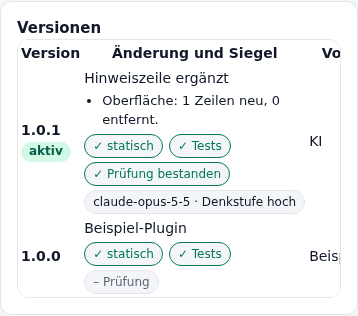
| Versions with their seals and the diff |  |
 |
 |
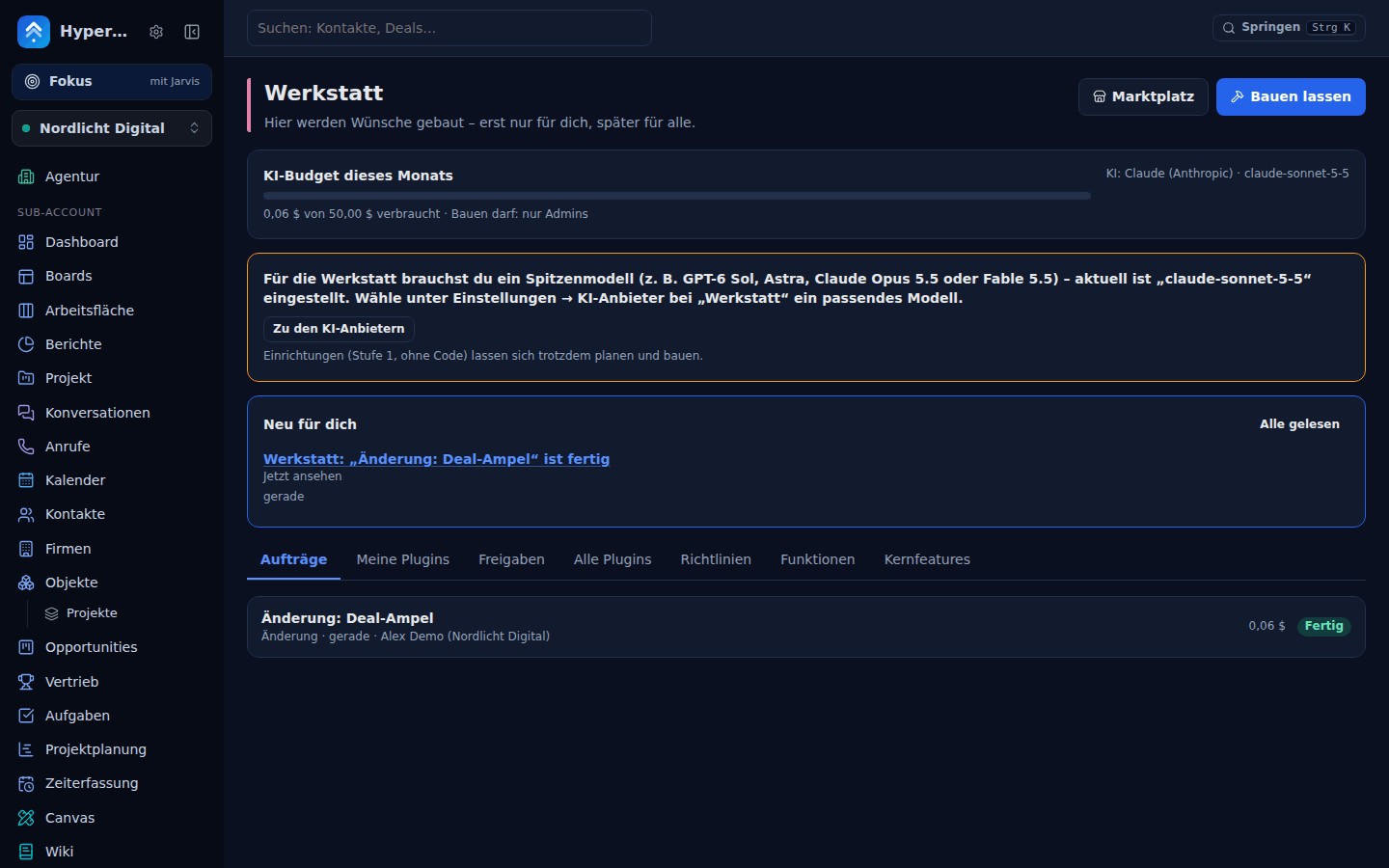
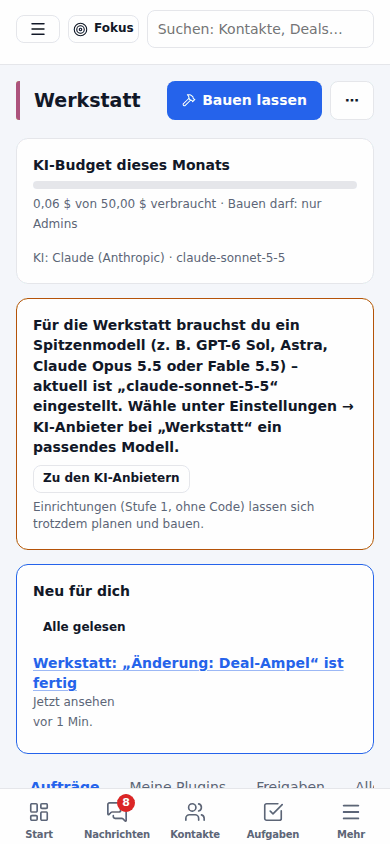
| The model gate says no (an everyday model is connected) | 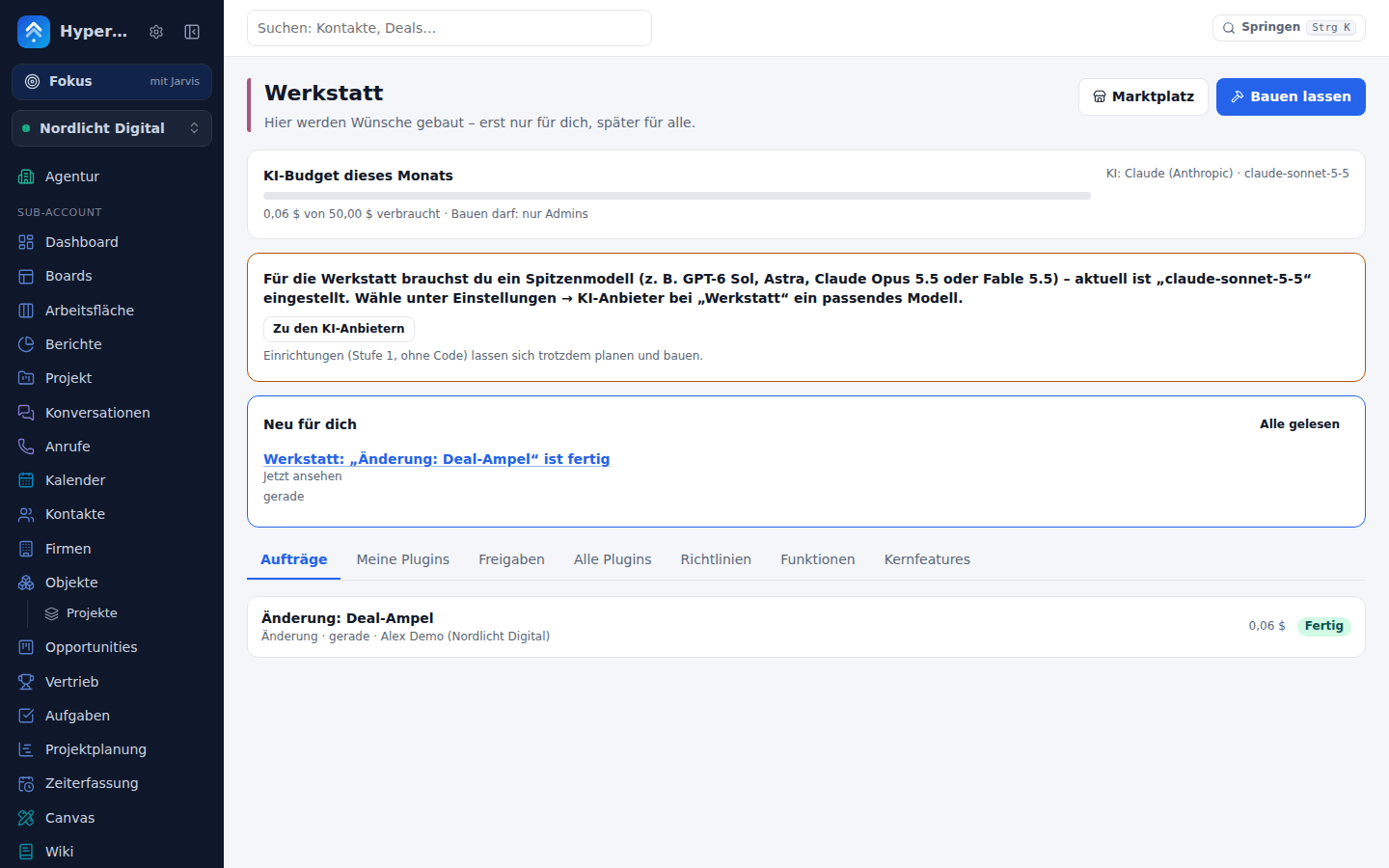 |
 |
 |
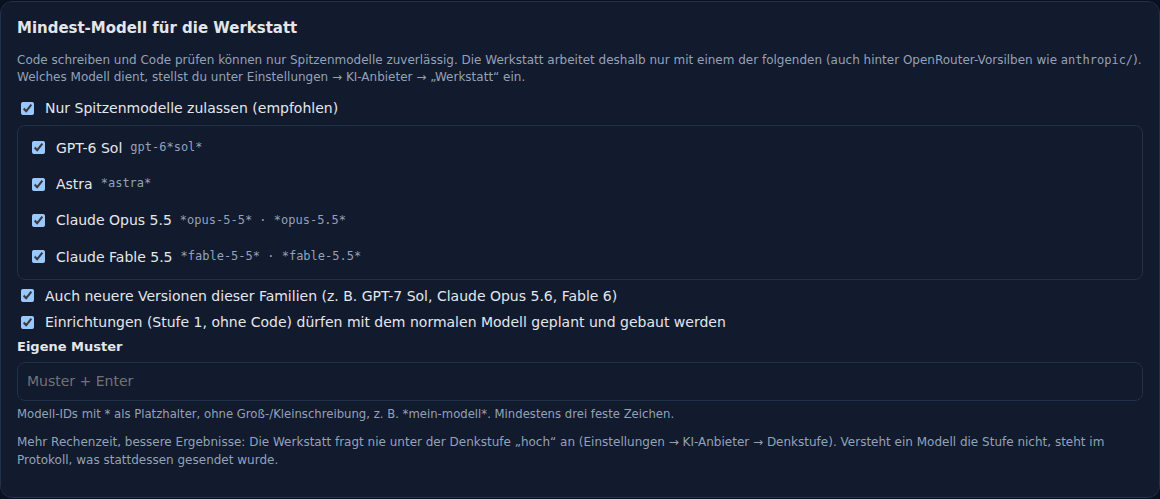
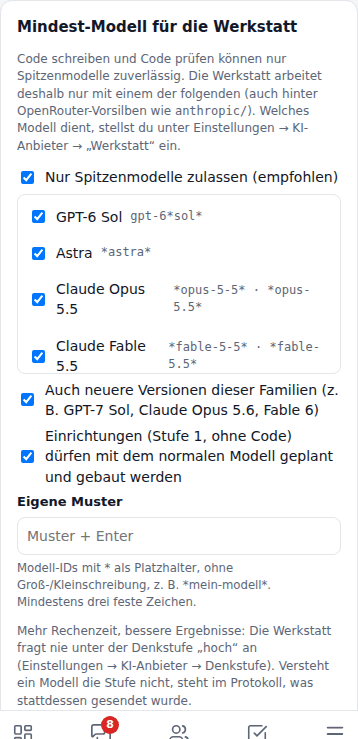
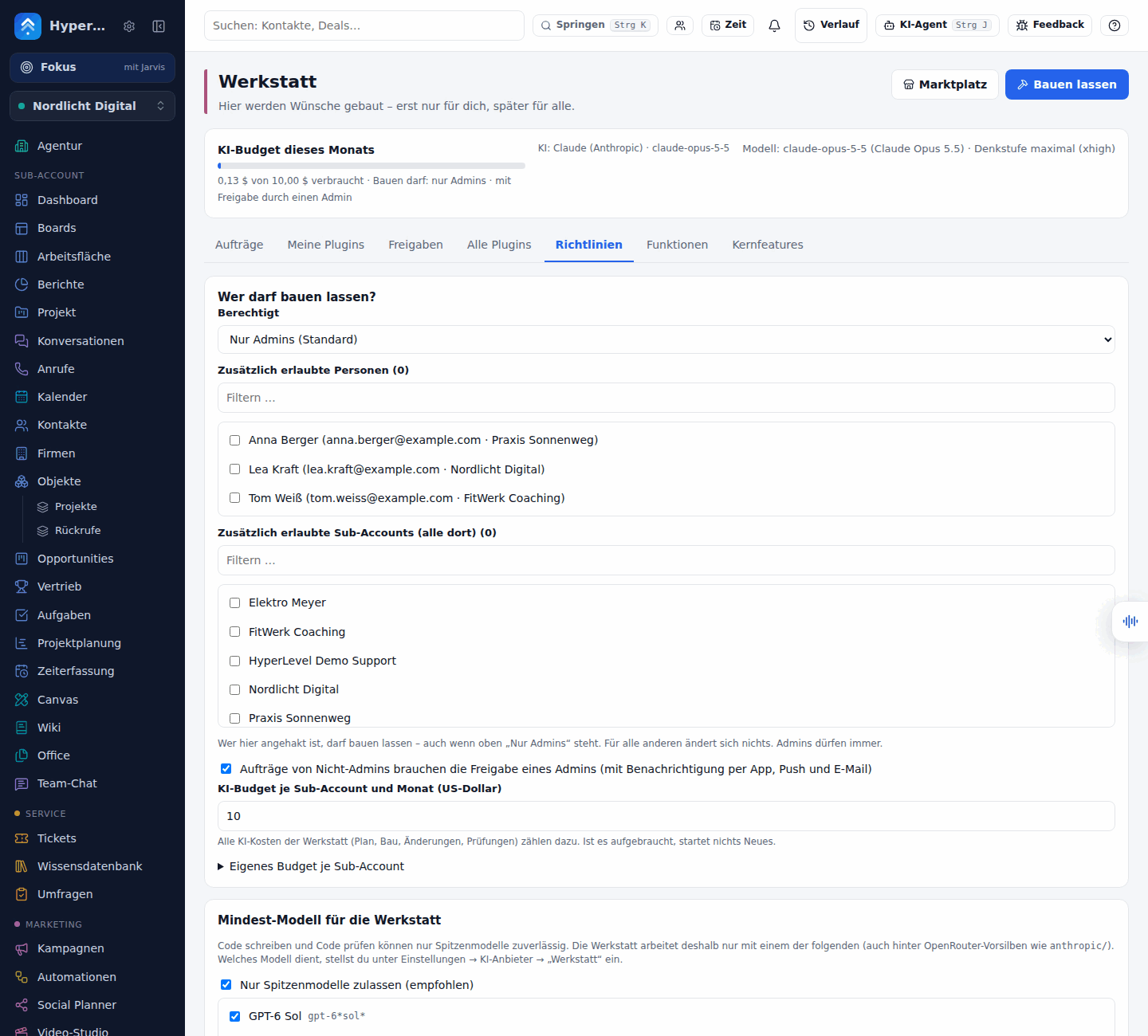
| Policy: Mindest-Modell | 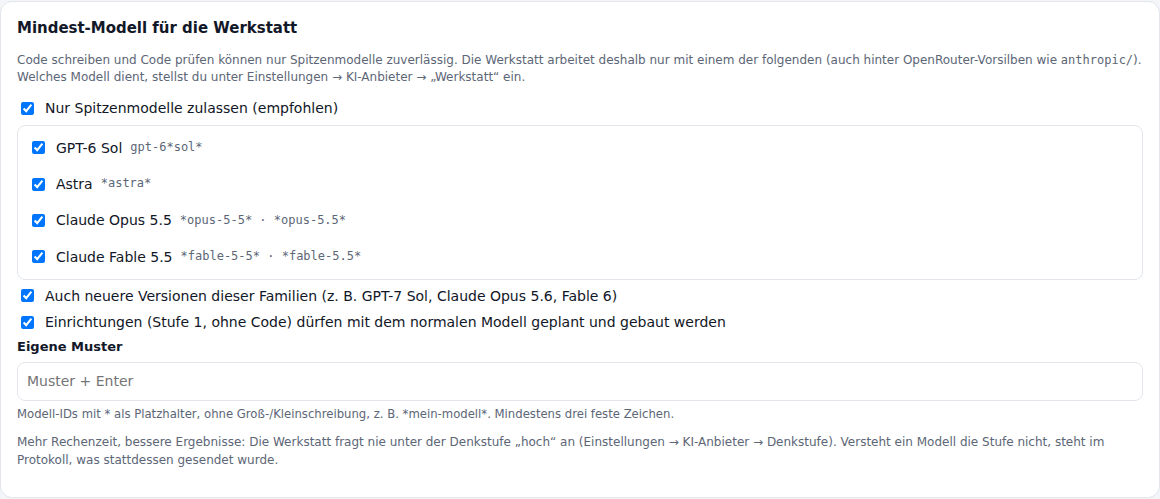 |
 |
 |
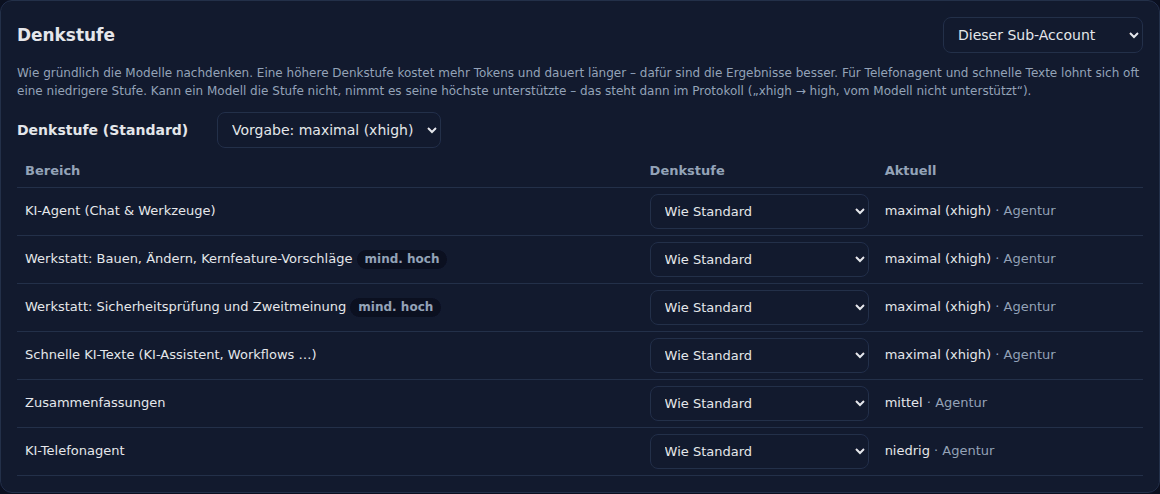
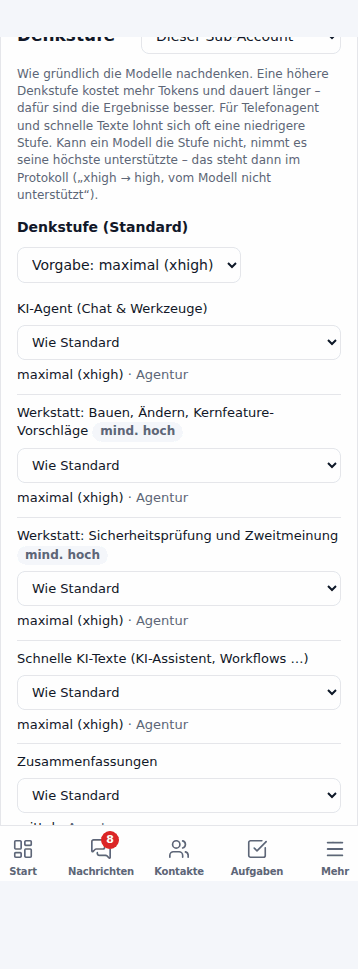
| KI-Anbieter → Denkstufe | 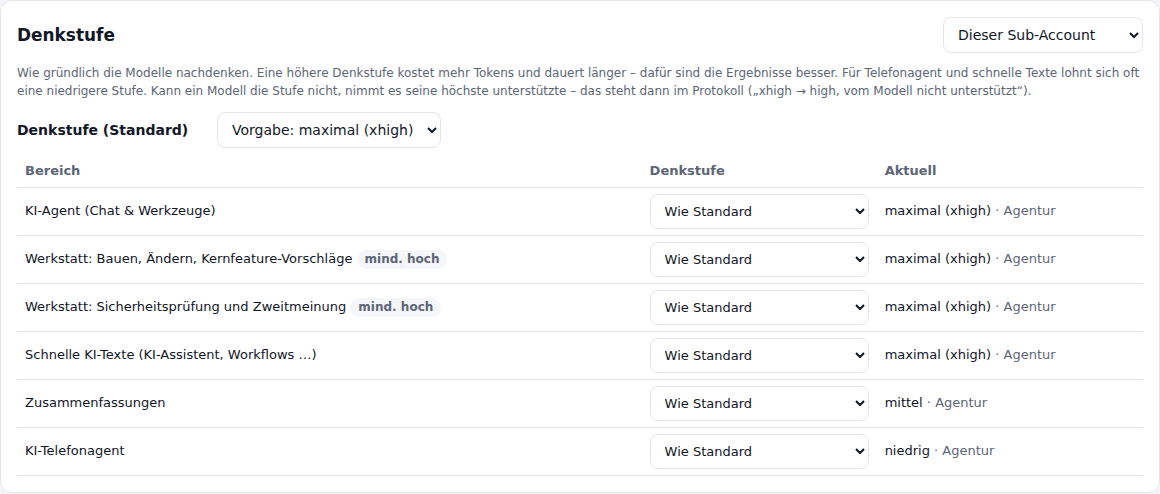 |
 |
 |
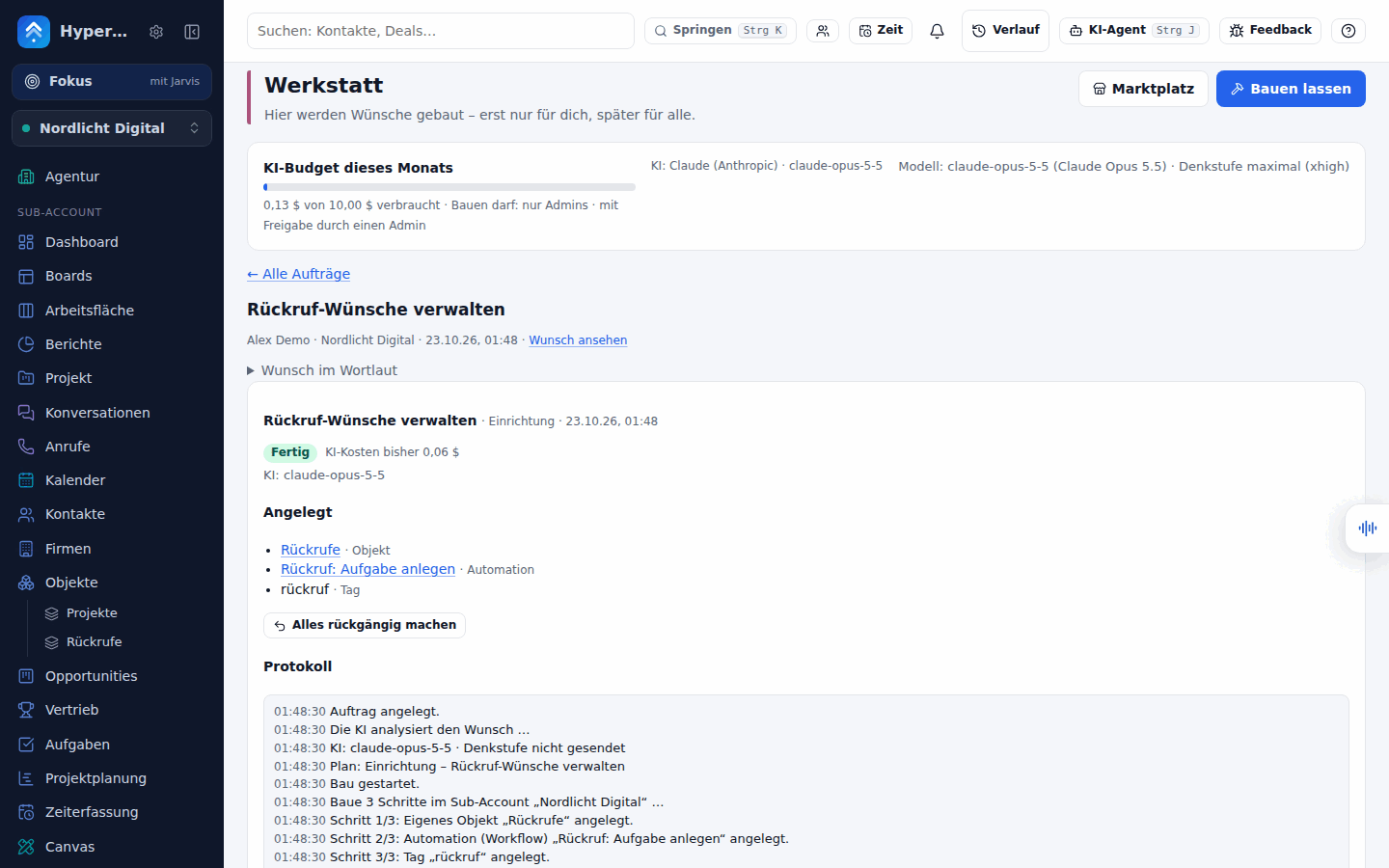
A plugin’s detail page with the live preview (image), a finished order with its log
(image) and the policy screen (image). They are made
from a fictional demo instance by scripts/werkstatt-screenshots.ts (scripted AI, no keys; see
Configuration).
Architecture
Section titled “Architecture”Everything is its own set of modules; nothing was added to the existing feature modules except small hooks
(app.services, a guard list, the workflow action registry).
| Module | What it does |
|---|---|
modules/werkstatt.ts |
Builds: analyse → plan → consent → (approval) → build, log, progress, cost, notes in the app, policy, dry run |
modules/plugins.ts |
Plugin store (versions, installs, rollout scopes), the bridge route, the isolated UI routes, workflow action plugin_action, the job scheduler, export/import |
modules/marktplatz.ts |
Catalogue, install with consent, updates, reviews, screenshots, AI security review and publishing |
modules/werkstatt-core.ts |
Stage 3: spec + GitHub issue for a coding agent, status tracking, “im Kern enthalten” |
modules/werkstatt-tools.ts |
MCP tools and the agent hint |
modules/flags.ts |
app.services.flags.enabled(name, { locationId, userId }) and the admin screen |
modules/ai-effort.ts |
Denkstufe settings (agency default, per capability, per sub-account) for aiRun and the agent chat |
modules/license.ts |
app.services.license.has('pro') – a stub that says yes until a license system exists |
services/werkstatt/* |
Pure logic: manifest, static checks, bridge, sandbox runner, declarative steps, generation prompts, policy, health, model gate (modelgate.ts, models.ts), signing (signing.ts, trust.ts), second opinion, version diff and badges |
services/ai-effort.ts |
Which Denkstufe a model takes and what each provider receives |
web/src/werkstatt/ChatCards.tsx |
The cards of the agent chat (plan, live progress, preview, diff) – a lazy chunk |
Two stages of building. The AI (through app.services.aiRun, so it works with Anthropic, OpenAI and any
OpenAI-compatible connection such as OpenRouter; structured output) decides per wish:
- Stufe 1 “Einrichtung” – no code. A plan of existing building blocks, created through the normal API as the requesting user, only in their sub-account: workflows (as drafts), custom fields, custom objects, properties, reports, dashboards, custom AI agents (private), templates, forms, pipelines, tags. Everything can be undone.
- Stufe 2 “Mini-App” – a plugin: manifest + UI + optional server logic. The AI is treated as an untrusted author: its output is parsed, validated, statically checked and self-tested in the sandbox; problems go back to the model (up to the policy’s Korrekturrunden, default 2) before the build gives up with a readable message. The log stays.
The order’s life: planning → planned (the plan: what is created, permissions, estimated cost) →
awaiting_approval (only if the policy asks) → building → done | failed; cancelled, rejected and undone
are the other ends. While it works the build shows a progress line with step names (“Schritt 2 von 3: …”,
“Plugin wird überarbeitet (Versuch 2 von 3)”) – the page polls every 1.5 s.
Notifications. Plan ready, approval needed, approved/declined, finished/failed: an entry in the app (strip on the
Werkstatt page, badge under the menu item), a push notification and – for decisions somebody waits for – an email.
The approval request goes to all admins with two push buttons Freigeben / Ablehnen and two links in the email
(/app/werkstatt/<id>?loc=<sub-account>&action=approve|reject). The links only open the order with its plan and
a confirmation dialog – nothing is ever decided by a link or a button press on the notification itself.
Push kind werkstatt can be switched off per user like the other kinds; emails respect the “E-Mail bei Antworten”
switch of Fehler & Wünsche. Orders and alarms that belong to a sub-account also land in the phone app’s notification
feed (/api/mobile/feed, event type werkstatt); app versions that do not know the type skip it.
Plugin lifecycle. A plugin has versions (1.0.0, 1.0.1, …) with a changelog; the first one starts private
(only its author). Ändern lassen writes a new version from chat feedback (estimate shown first); the old versions stay
and can be restored. A version that asks for more permissions than the active one needs a new consent before it
becomes active. Rollout scopes: private → location (the sub-account) → agency (all sub-accounts, admins only) →
marketplace (admins only, after the security review).
Policy, approval and budget
Section titled “Policy, approval and budget”Werkstatt → Richtlinien (admins; agency-wide, stored in agency_settings). The defaults are safe:
| Setting | Default | Meaning |
|---|---|---|
Wer darf bauen (who) |
admins |
admins, team (people with the right “Einstellungen”) or everyone of a sub-account |
Zusätzlich erlaubte Personen / Sub-Accounts (allow_users, allow_locations) |
empty | Grants only: these people (or everyone in these sub-accounts) may build even when who is admins. Never restricts a wider who. |
Freigabe (approval) |
on | Builds by non-admins wait for an admin’s approval |
Budget (budget_usd, budgets) |
5 $ per sub-account and month | All AI cost of the Werkstatt (plans, builds, changes, reviews, specs) counts; when it is used up nothing new starts. Own amount per sub-account possible. |
Korrekturrunden (repair_rounds) |
2 | How often the model may repair an unusable answer or a failed check (0–4) |
Server-Logik (server_logic) |
script |
script (sandbox), declarative (steps only) or off |
Externe Hosts (allowed_hosts) |
none | Hosts a plugin may declare for images/fonts/scripts/connections |
Notausschalter (kill) |
10 errors in 10 min and ≥ 50 %, or an average of 8000 ms over ≥ 10 calls | See Kill switch |
Mindest-Modell (model_gate) |
on, all four families, newer versions, Stufe 1 with the normal model | See Model gate |
Zweitmeinung (second_opinion) |
on | Pro; publishing waits for a second opinion when a second model is connected |
Signierte Plugins (trusted_keys) |
none | Public Ed25519 keys whose signed bundles count as „signiert“ (the HyperLevel keys are built in) |
Kernfeatures (core) |
– | GitHub repository, agent (@codex / @claude), sub-account holding the GitHub token |
Costs: the plan shows the model and an estimate (typical and worst case with repair rounds) before the requester
confirms; the build’s real cost (from the provider’s usage) is added to the order and to the month’s total. The AI
connection used is whatever aiRun resolves for the sub-account: the BYOK routing for “Text” (a sub-account’s own or the
agency’s), otherwise the assistant’s own Anthropic/OpenAI key. The KI-Assistent must be switched on in the
sub-account (Einstellungen → KI-Assistent) – the Werkstatt shows exactly that as a hint when it is not.
Model gate and Denkstufe
Section titled “Model gate and Denkstufe”Model gate (Mindest-Modell)
Section titled “Model gate (Mindest-Modell)”Writing code and judging it is only as good as the model behind it. The Werkstatt therefore works with a top model
only: Werkstatt → Richtlinien → Mindest-Modell. Four families are built in, matched case-insensitively and also behind
an OpenRouter vendor prefix (anthropic/claude-opus-5.5):
| Family | Patterns |
|---|---|
| GPT-6 Sol | gpt-6*sol* |
| Astra | *astra* |
| Claude Opus 5.5 | *opus-5-5*, *opus-5.5* |
| Claude Fable 5.5 | *fable-5-5*, *fable-5.5* |
- Newer versions of these families (GPT-7 Sol, Claude Opus 5.6, Fable 6 …) count too (switch, default on). Versions
are compared, not guessed:
claude-opus-4-20250514is not newer. - Admins can switch families off one by one and add own patterns (
*my-model*; globs with at least three fixed characters, so no blanket*). - Stufe 1 may use the normal model (switch, default on): planning and building a configuration from existing blocks (no code) works with whatever is connected. A Mini-App plan made with a weaker model is shown with the refusal, Plan neu erstellen plans it again once a top model is connected.
- What is gated: writing plugins (
werkstatt_build, also “Ändern lassen”), the security review and the second opinion, core specifications – and, with Stufe 1 switched off, the plan as well. The check happens before a single token is spent, and again when the build starts. - The refusal is plain German with a link: „Für die Werkstatt brauchst du ein Spitzenmodell (z. B. GPT-6 Sol, Astra,
Claude Opus 5.5 oder Fable 5.5) – aktuell ist „…“ eingestellt. Wähle unter Einstellungen → KI-Anbieter bei „Werkstatt“
ein passendes Modell (
/app/settings/ai-providers).“ (members are told to ask an admin).
Which model serves the Werkstatt is its own routing capability in Einstellungen → KI-Anbieter → Wofür welches Modell?: Werkstatt (builds, changes, plans, specs; falls back to Text), and Werkstatt: Zweitmeinung (the second reviewer, see Sicherheitsnetz). A model id can be typed for either.
Denkstufe (reasoning effort)
Section titled “Denkstufe (reasoning effort)”Einstellungen → KI-Anbieter → Denkstufe: how hard the models think. One Denkstufe (Standard) – built in:
maximal (xhigh) – and an optional level per capability: KI-Agent, Werkstatt (build, change, specs), Werkstatt
(review, second opinion), quick AI texts, summaries, phone agent. It can be set for the whole agency and, optionally,
per sub-account (the sub-account’s own value wins). A higher level costs more tokens and takes longer; phone agent and
quick texts are usually fine with a lower one. The Werkstatt never goes below „hoch“ – a lower setting is raised.
What a provider receives:
| Wire | Parameter |
|---|---|
| Anthropic Messages | output_config.effort (Claude 5 family; Haiku has none) |
| OpenAI Responses | reasoning.effort (gpt-5, o-series, gpt-6) |
| OpenAI-compatible Chat Completions (OpenAI, Azure, Gemini’s layer, Groq …) | reasoning_effort |
| OpenRouter | reasoning: { effort } |
A model that cannot take the level gets the highest it supports and says so in the build log: „KI: claude-sonnet-5-5
· Denkstufe hoch (xhigh → high, vom Modell nicht unterstützt)“. A model without any reasoning control gets nothing sent
in everyday calls. If a provider refuses the level, an everyday call is repeated once without it; the Werkstatt (which
must not think less quietly) fails with a clear message instead. Model and Denkstufe are shown on every build, on every
plugin version (badge row) and in the dry run. See services/ai-effort.ts for the model table.
Sicherheitsnetz
Section titled “Sicherheitsnetz”The safety net around what AI agents build, from the first line to the Marktplatz:
- Before it runs: static checks, the sandbox self-test with one smoke run per entry point (page, every panel with the context of its contact or deal, every widget, every action and job) – a panel that crashes fails the version even if the page works.
- Badge row on every version (plugin page → Versionen): static ✓ · tests ✓ (with „3/3 Einstiegspunkte“) · Sicherheitsprüfung bestanden · Zweitmeinung · signiert / „ungeprüft“ · model and Denkstufe. Under the changelog a diff summary says what changed (new permissions, entry points, lines of UI and server code).
- Before the Marktplatz: the AI security review (checklist, only with a top model), then – Pro – a second opinion by a different allowed top model. It must differ from the model that wrote the version and from the one that did the first review; it answers the same checklist independently, and the publish dialog shows both verdicts side by side with what differs. A failed second opinion blocks publishing; hints need the same explicit „gelesen“. When a second model is connected (routing Werkstatt: Zweitmeinung) and the policy asks for it (default), publishing waits for it.
- While it runs: health per plugin (errors, average response time, usage), the kill switch with notification, and one-click rollback.
- Core proposals never auto-deploy. Als Kernfeature vorschlagen only writes a spec and opens an issue; the pull
request needs green CI (typecheck, tests, build) and a human review, and the feature starts behind a feature flag
(
core.<slug>, off). The issue says so.
In the agent chat
Section titled “In the agent chat”The HyperLevel Agent runs the whole lifecycle in the conversation (Realtime Feature Lifecycle):
- A wish („Ich hätte gern eine Ampel, die zeigt, welche Deals lange liegen“) – the agent checks the Marktplatz first
(
ghl_list_plugins), then callsghl_build_from_wish(planning only: a few cents, builds nothing). - The plan as a card in the chat: what is built, permissions with risk, estimated cost, model and Denkstufe – and the model gate’s message if the connected model is too weak. The person confirms with the card’s own button (same route as in the Werkstatt, same consent: the confirm must list exactly the plan’s permissions). The agent itself never confirms a plan unless the person says „ja, bauen“ in the chat – and then the agent’s confirm still asks first (class sensitive, also in „Autonom“).
- Live progress: the same card shows the step names while the build runs (polling), „Wartet auf Freigabe“ when the policy asks for an admin’s approval.
- A preview card: the finished plugin appears inline in a sandboxed frame (
sandbox="allow-scripts", noallow-same-origin; panels in sample-data mode) with its seals and the buttons Öffnen, Ändern lassen (a text field with the cost estimate), Version zurück and Verwerfen. - Conversational changes: „Mach die Karten dunkler“ →
ghl_change_plugin→ version 2 with the diff summary in the card and in the agent’s answer; the old version stays, rollback is one click. - Admins manage the lifecycle from the chat:
ghl_plugin_overview(waiting approvals, plugins with health, review and Marktplatz state) andghl_plugin_admin(approve or reject an order, review, second opinion, publish, unpublish, rollback, disable, enable, rollout scope, core proposal). Each asks for confirmation; publishing needs the review id and the admin’s explicit approval, exactly like the dialog.
Only the newest card of an order is interactive; older ones shrink to one line. The cards are one lazy chunk that loads when a result of these tools is on screen.
License: AGPL core and Pro
Section titled “License: AGPL core and Pro”The plugin runtime and local builds with your own AI key stay in the AGPL core and never ask for a license: building,
the sandbox, private/sub-account/agency-wide rollout, export/import of unsigned bundles, the single AI security review,
the kill switch, rollback and the agent chat. A few things around them are Pro and sit behind a license check
(app.services.license.has('pro'), services/werkstatt/license.ts):
| Pro feature | Where |
|---|---|
| Publishing to and installing from the Marktplatz (per sub-account, with consent screens) | publish, install, update routes |
| Installing HyperLevel-signed plugins (Ed25519) | import of a bundle whose signature is valid for a trusted key |
| The second opinion by another top model | publish dialog |
| The advanced rollout: a percentage of the sub-accounts | feature flag stage „Prozent“ |
Browsing the Marktplatz, running installed plugins and everything above stays available without a license; a missing license is a plain German message („… ist eine Pro-Funktion – dafür ist eine HyperLevel-Pro-Lizenz nötig. Plugins bauen und nutzen funktioniert weiterhin ohne Lizenz.“), and the screens mark these places with a small Pro.
There is no license system yet. modules/license.ts registers a stub whose has() is always true, so nothing is
locked today and self-hosters change nothing. A future license module only has to assign its own
app.services.license = { has(feature) }; hasPro() treats a missing service as licensed.
Signed plugins. A bundle (*.gohigh-plugin.json) can carry an Ed25519 signature over its content (canonical JSON of
format, bundle_version, plugin, version, integrity). On import the app checks it against the keys it trusts:
| Result | Meaning | Install |
|---|---|---|
| signiert | valid signature of a trusted key („von HyperLevel signiert“ for the built-in keys) | Pro |
| ungeprüft (no signature, or a key this installation does not know) | warning with the reason | only after the importer ticks „ich weiß, dass das Paket ungeprüft ist“ (accept_unverified) |
| ungültig | signature does not match the content – edited after signing or forged | refused, no way around it |
Trusted keys: the built-in HyperLevel keys (services/werkstatt/trusted-keys.ts, public keys only; the built-in id always
wins, nobody can claim it through the settings), PGHL_PLUGIN_TRUSTED_KEYS (JSON), and Werkstatt → Richtlinien →
Signierte Plugins. An installation that sets PGHL_PLUGIN_SIGNING_KEY signs its own exports. scripts/werkstatt-sign.mjs
makes keys and signs/verifies bundles for publishers:
node scripts/werkstatt-sign.mjs keygen --id gohigh-2026 --out ./keys # private key stays with the publishernode scripts/werkstatt-sign.mjs sign my-plugin.json --key ./keys/gohigh-2026.private.pem --id gohigh-2026node scripts/werkstatt-sign.mjs verify my-plugin.signed.json --public "$(cat ./keys/gohigh-2026.public.txt)"Maintainers: the HyperLevel publisher key pair has to be generated by HyperLevel (never commit the private half); its public half goes into
GOHIGH_PUBLIC_KEYS. Until a key is listed there, no bundle counts as HyperLevel-signed.
Security model
Section titled “Security model”A plugin is code written by an AI (or a stranger, if imported). The design assumes it is hostile and layers the defences; none of them relies on the plugin behaving.
UI isolation (browser). The plugin UI is a document served from a dedicated route (/plugin-frame/<version>) and
embedded as <iframe sandbox="allow-scripts"> – without allow-same-origin, so it has an opaque origin: no
cookies, no localStorage, no access to the app. Its CSP (response header and the iframe sandbox directive):
default-src 'none'; scripts/styles only inline (plus declared and admin-allowed hosts); connect-src 'none';
no frames, workers, objects. It talks to the app only through postMessage with a host page
(/plugin-host/<id>, nonce CSP, frame-ancestors 'self'). The host page checks every request against a fixed
catalogue of operations and the manifest, and relays it to POST /api/plugins/<id>/call. The session cookie and
CSRF header belong to the app’s frame, never to the plugin. Navigation of the frame is detected and the plugin is
stopped.
The bridge (services/werkstatt/bridge.ts) is the one place where plugin requests become API calls. For each
call it checks: (1) the operation is in the catalogue; (2) the plugin’s manifest scope allows it (an undeclared
scope is denied and counted as an event); (3) the user’s own permission area (contacts, conversations, …) – a
member without access to conversations cannot read them through a plugin; (4) the call is made as that user,
pinned to the current sub-account through the internal route caller (never a location from the request body);
guards refuse everything outside an allow-list of routes for via=plugin; (5) limits: 600 calls per minute per
plugin and user, AI 30 calls per hour per plugin and sub-account, storage 100 keys / 64 KB per value / 512 KB per
plugin and sub-account. Records a plugin creates are tracked so Deinstallieren → aufräumen can remove them. There
is deliberately no scope for sending messages, deleting records or payments.
Server logic in a child process (jobs, workflow actions in server_mode: "script"): Node 22’s permission
model (node --permission with no --allow-*: no file system, no child processes, no workers, no addons, no WASI),
--max-old-space-size=96, --disallow-code-generation-from-strings, a hard timeout with SIGKILL, a call limit
(200 per run) and IPC to the bridge as the only way out. Inside the child the code runs in a vm context with no
ambient authority (no process, require, timers, typed arrays; strings code generation off) and only JSON strings
cross the boundary – never host objects.
Static checks before a version may be active (services/werkstatt/checks.ts): size limits (UI 200 KB, server
100 KB, steps 40 KB, total 320 KB), forbidden APIs (network, storage, eval/Function, window.open, navigation,
workers, dynamic import, obfuscation hints …), forbidden tags/attributes (iframe, object, embed, base, meta,
link, inline event handlers with URLs, javascript:), external URLs and hosts only when declared in the manifest
and on the admin’s allow-list, operations used vs. scopes declared, entry points vs. code. Then the self-test
runs every handler and the UI scripts in the sandbox with sample data (nothing real is read or written).
Honest limits.
- Node’s permission model does not restrict the network. The runner patches every function that opens a
connection (net/tls/http/https/http2/dgram/dns) and the sandbox probe verifies it, but the strongest guarantee is
an own network namespace: where
unshare -rnworks (Linux with user namespaces) the child runs inside one and has no network device at all. The status screen (Richtlinien → Sandbox) shows which of the two protects this server. SetPGHL_PLUGIN_NETNS=offto disable the namespace. vmis not a security boundary on its own; it is one layer under the permission model, the memory cap, the timeout and the namespace.- Static checks are regex-level; obfuscated code can slip past them. The runtime isolation is the real protection – that is why both are there and why a published plugin also gets an AI review.
- A browser engine bug could break out of an iframe sandbox; keep the browser updated. WebRTC is neutralised in the frame bootstrap and statically forbidden; DNS prefetch is switched off by header.
- The AI that writes a plugin can be prompt-injected through the wish text. The wish is treated as data, the output is parsed strictly, and nothing the model says is executed before the checks, the self-test and – for sharing – the review and an admin.
Why two kinds of server logic
Section titled “Why two kinds of server logic”Some servers cannot run the permission-restricted child process (an old Node, a sandbox that forbids it, a container
without unshare). The Werkstatt therefore knows declarative steps – a list of calls to the same operations with
{{templates}}, foreach and if, interpreted by the server itself. No code runs, so there is nothing to escape
from. The policy can force it (server_logic: declarative), and the Werkstatt falls back to it automatically when the
sandbox probe fails, telling the user in the plan. Script plugins are the flexible option; declarative plugins are the
one you can always trust to run anywhere.
Kill switch
Section titled “Kill switch”Every error of a plugin (UI error reports, failed runs, denied calls) is an event. When a plugin has errors events in
window_min minutes and they make up at least ratio of its events, it is switched off in all sub-accounts, admins are
notified and an automatic error is filed in Fehler & Wünsche (the existing error capture). An admin can switch it
on again (Plugin → Wieder einschalten) or kill it by hand.
Slowness counts too. When the average response time of a plugin’s calls, jobs and actions over the window reaches
latency_ms (default 8000 ms, 0 = off) and there were at least min_calls of them, the plugin is switched off the
same way (“Zu langsam: im Schnitt 900 ms in 10 Minuten …”). The Werkstatt page and the plugin’s health card show the
average of the last 24 hours and the error rate.
Who hears about it. Admins and the plugin’s author get a note in the app (kind alarm), a push notification with the
button Zurückrollen and an email with the same link. The link (/app/werkstatt/plugins/<id>?action=rollback) only
opens the rollback confirmation – nothing is rolled back by a link or a button on the notification itself.
One-click rollback (POST /api/plugins/:id/rollback {version_id?}): the version before the active one (or the one
named) runs again – for the author, for every install that was pinned to the bad version and, if the Marktplatz offered
it, for the listing (when the older version was never reviewed, the listing is taken down instead). A killed plugin is
switched on again with a clean slate; the bad version stays in the list. A rollback never asks for new permissions: the
older version ran before, so what it needs was accepted.
Writing a plugin by hand
Section titled “Writing a plugin by hand”You do not need the AI. A plugin is one JSON bundle (*.gohigh-plugin.json); Werkstatt → Meine Plugins → Plugin
importieren takes it, shows the consent list and runs the same checks and self-test as for an AI-written one. Exportieren
makes one from any plugin you can see – that is also how self-hosters share plugins.
{ "format": "gohigh-plugin", "bundle_version": 1, "exported_at": "2026-01-01T00:00:00.000Z", "plugin": { "name": "Hallo", "slug": "hallo", "description": "Zeigt eine Begrüßung.", "category": "sonstiges", "icon": "sparkles" }, "version": { "version": "1.0.0", "manifest": { "name": "Hallo", "slug": "hallo", "icon": "sparkles", "version": "1.0.0", "description": "Zeigt eine Begrüßung.", "category": "sonstiges", "scopes": ["contacts:read"], "entries": { "page": { "title": "Hallo" } } }, "ui_html": "<div id=\"out\"></div><script>gohigh.ready(async function (ctx) { var r = await gohigh.contacts.list({ limit: 1 }); document.getElementById('out').textContent = 'Kontakte: ' + r.total; });</script>", "server_js": "", "steps": null, "changelog": "Erste Version" }, "integrity": "<sha256 over manifest, ui_html, server_js, steps – a hand-written bundle may leave it wrong; the importer is told>"}The importer validates everything again, never trusts ids or flags, and starts the plugin private and unreviewed.
Manifest reference
Section titled “Manifest reference”| Field | Type | Notes |
|---|---|---|
name |
string, 2–60 | |
slug |
a-z0-9-, 2–40 |
Made unique per installation (suffix) |
icon |
Lucide-style name, e.g. gift, sparkles, traffic-cone, star |
Unknown names show a puzzle piece |
version |
x.y.z |
The server sets it for new versions |
description |
string, 5–400 | |
category |
vertrieb, kontakte, kommunikation, berichte, ki, service, marketing, sonstiges |
|
scopes |
list of scope keys (max 20) | Only what the code uses – the review flags unused ones |
entries.page |
{ title, icon? } |
A page in the menu below Marktplatz |
entries.panels |
[{ id, on: "contact"|"deal", title, height? }] (max 3) |
height 80–600 px |
entries.widgets |
[{ id, title, size?: "s"|"m"|"l" }] (max 3) |
Dashboard |
entries.actions |
[{ id, label, fields?: [{ key, label, type?: "text"|"textarea"|"number" }] }] (max 5) |
Workflow step Plugin-Aktion; fields are merge-field templates |
entries.jobs |
[{ id, label, every: "hourly"|"daily"|"weekly", at?: "HH:MM", weekday?: 0-6 }] (max 3) |
at is local time of the sub-account |
server |
{ mode: "script"|"declarative" } |
Required for actions and jobs |
externalHosts |
list of host names (max 5) | Only effective when an admin allowed them; default: none |
author |
string | optional |
At least one entry point is required. Unknown keys are rejected. ids are a-z0-9_, starting with a letter.
Scopes (services/werkstatt/manifest.ts; the consent screen shows label, hint and risk):
| Scope | Allows | Risk |
|---|---|---|
contacts:read / contacts:write |
read contacts, notes, tasks / create, update, tag | medium / high |
notes:write |
add notes to contacts | medium |
tasks:read / tasks:write |
your tasks / create, update, complete | low / medium |
conversations:read |
messages with contacts | high |
opportunities:read / opportunities:write |
deals and pipelines / move, change status and value | low / high |
calendars:read |
appointments | low |
companies:read / companies:write |
companies | low / medium |
tickets:read, invoices:read |
tickets, invoices and estimates | medium |
objects:read / objects:write |
records of custom objects | low / medium |
reports:read |
run report queries | medium |
ai:run |
text with the sub-account’s AI provider (costs tokens, 30 per hour) | medium |
Every operation also needs the user’s own permission area. storage.* (plugin storage) is always allowed.
UI API (inside ui_html, a body fragment with inline <style>/<script>; no <html>, <head>, <iframe> …):
gohigh.ready(async function (ctx) { // ctx: { entry, entity, today, location, plugin, demo } const { contacts } = await gohigh.contacts.list({ limit: 20 }); gohigh.toast('Fertig'); // gohigh.toast(text, 'error') gohigh.navigate('contacts/' + contacts[0].id); // internal pages only (also <a href="contacts/<id>">) gohigh.resize(240); // pages/widgets can ask for a height});Operations are gohigh.<area>.<name>(args) and return promises: contacts.list/get/create/update/tag, notes.add,
tasks.list/create/update, conversations.list/messages, opportunities.list/update, pipelines.list,
appointments.list, companies.list/create, tickets.list, invoices.list, objects.types/list/create,
reports.run, ai.complete, storage.get/set/remove/list. Exact arguments and results: the Funktionen block of the
authoring guide in generate.ts (AUTHORING_GUIDE) and
ops.ts. Ready-made CSS variables (--bg --panel --text --muted --line --brand …,
light/dark) and classes (gh-card, gh-row, gh-btn, gh-table, gh-badge …) come with the frame. Not available:
fetch, XMLHttpRequest, storage, cookies, eval, window.open, parent, postMessage.
Server script (server_js, server.mode: "script"): plain JavaScript, no import/require/process/timers.
gohigh.action('notify_owner', async function (input) { // input: the manifest fields + contact { id, name, email } await gohigh.notes.add({ contact_id: input.contact.id, body: input.text }); return { ok: true };});gohigh.job('daily_check', async function () { const today = gohigh.context.today; // { today, today_md, now, location, input } gohigh.log('Heute ist ' + today);});Jobs and actions run as the user who installed the plugin (private install: that person; sub-account or agency-wide: the admin who released it), at most 200 calls and 10 seconds per run.
Declarative steps (steps, server.mode: "declarative"):
{ "actions": { "followup": [ { "op": "tasks.create", "args": { "title": "{{input.text}} – {{contact.name}}", "contact_id": "{{contact.id}}" } }] }, "jobs": { "daily": [ { "op": "contacts.list", "args": { "limit": 100 }, "as": "res" }, { "foreach": "res.contacts", "as": "c", "do": [ { "if": { "path": "c.date_of_birth", "op": "endswith", "value": "{{today_md}}" }, "then": [ { "op": "tasks.create", "args": { "title": "Gratulieren: {{c.first_name}}", "contact_id": "{{c.id}}" } } ] } ] }] } }Steps: {op, args?, as?}, {foreach, as, do, limit?}, {if:{path, op: eq|ne|gt|lt|contains|endswith|empty|notempty, value?}, then, else?},
{set, value}, {result}. At most 50 steps, 3 levels, 200 iterations. Templates: {{input.field}}, {{contact.id}},
{{today}}, {{today_md}}, {{name.path|fallback}}.
Examples to start from (and to install from Werkstatt → Meine Plugins → Beispiele): geburtstags-erinnerungen
(daily job creating tasks, plus a page), deal-ampel (dashboard widget and page showing deals as traffic lights),
notizen-zusammenfassung (contact panel, AI summary), followup-aufgabe (declarative workflow action). Source:
examples.ts.
Marktplatz
Section titled “Marktplatz”- Installing. Per sub-account (team right “Einstellungen”) or just for yourself. The consent screen lists exactly the manifest’s permissions with their risk; the server only accepts the install when the consent equals that list. Plugins whose server logic or external hosts the policy does not allow cannot be installed.
- Updates show the changelog since the installed version; new permissions need a new consent, unchanged ones update without asking.
- Uninstalling removes the plugin from the sub-account; optionally also the data it stored and the records it created there.
- Ratings and reviews. Anyone who has the plugin (also while it is still private – the rating helps the admin decide) can rate 1–5 and write a note; the Marktplatz shows average, count and installs.
- Screenshots: authors/admins upload up to four; admins can capture one automatically (opt-in, see Configuration). The detail page also has a live preview with sample data running in the same sandbox – no real data involved.
- Curation. Only admins publish, in two steps: an AI security review (a checklist: scopes minimal, no
exfiltration, no external resources, no dangerous APIs, data handling, writes justified, AI injection, matches
description, robustness) merged with the program’s own findings (which can only make the verdict worse), then the
admin’s own approval.
failblocks,warnneeds an explicit “ich habe die Hinweise gelesen”. A review belongs to the exact version. Only a top model reviews (Model gate); with Pro a second opinion by a different top model comes in between (Sicherheitsnetz). Publishing, installing and updating through the Marktplatz are Pro features (License); browsing is free. - Health per plugin: installs, usage, errors (24 h / 7 d), votes of the wish, rating – and the kill switch.
- Export / import as JSON bundle (see above).
Stage 3: core features and feature flags
Section titled “Stage 3: core features and feature flags”For a popular plugin, admins choose Als Kernfeature vorschlagen: the AI writes a spec from the wish, the plugin’s
code and its usage data; the github-codex module opens an issue in the configured repository with an
@codex or @claude instruction (the GitHub token is the sealed one of Einstellungen → KI-Werkzeuge → GitHub für
Codex; repository and agent are in the policy or typed in the dialog). Without token or repository the dialog says
so and the spec is kept – the issue can be opened later under Werkstatt → Kernfeatures. The proposal is tracked:
issue → pull request → merged. When the core version ships (entered by hand, or automatically when the app reaches the
target version of a merged proposal) the plugin is marked “im Kern enthalten” and its installs migrate
(switched off, data kept) or retire (removed); everyone who had it is notified.
Feature flags let core features roll out in stages: Aus → Privat (chosen users) → Sub-Accounts (chosen) → Prozent (a stable share of sub-accounts) → Alle, each stage including the ones before. The percentage stage is the advanced
rollout and a Pro feature (the other stages are free).
// in a module of its ownapp.services.flags.define('core.deal-ampel', { description: 'Deal-Ampel im Dashboard' }); // once; starts switched offif (app.services.flags.enabled('core.deal-ampel', { locationId, userId })) { … }The web app can ask GET /api/flags/me for the flags that are on for the signed-in user. Admin screen:
Werkstatt → Funktionen.
MCP tools and the agent
Section titled “MCP tools and the agent”| Tool | What |
|---|---|
ghl_list_plugins |
Plugins visible in the sub-account (and the Marktplatz), with status and health |
ghl_install_plugin |
Install a Marktplatz plugin. The first call only shows the permissions; with accept_permissions: true (after the user saw them) it installs (Pro) |
ghl_build_from_wish |
Start a build from a wish or a text – same policy, model gate, approval and budget as in the app; plans only (the chat shows the plan as a card); with build_id, confirm and accept_permissions it confirms the plan. wait: false answers at once |
ghl_plugin_status |
Version, status, health, seals per version, builds of a plugin; the live state and the diff of a build |
ghl_change_plugin |
„Ändern lassen“: a new version from a conversation, returns the diff summary |
ghl_discard_plugin |
Delete a plugin of the user (destructive: always asks) |
ghl_plugin_overview |
Admins: orders waiting for approval, plugins with health, review and Marktplatz state |
ghl_plugin_admin |
Admins: approve_build, reject_build, review, second_opinion, publish, unpublish, rollback, disable, enable, scope, core_proposal |
They need a user identity (an agency key or a session) because installing and building are always as somebody. The agent
class of a call follows the risk: planning is an ordinary write (a few cents), confirming a build, changing, discarding and
the admin tool are sensitive (a confirmation card even in „Autonom“). The HyperLevel Agent is told this in its prompt
(app.services.agentPromptExtras), see In the agent chat.
Configuration
Section titled “Configuration”| Setting | Where | Notes |
|---|---|---|
| Policy | Werkstatt → Richtlinien | see above |
| AI connection | Einstellungen → KI-Anbieter / Agentur → KI-Werkzeuge | Anthropic, OpenAI or any OpenAI-compatible preset; routing “Text” decides who serves aiRun |
| KI-Assistent on | Einstellungen → KI-Assistent | per sub-account |
| Denkstufe | Einstellungen → KI-Anbieter → Denkstufe | default xhigh; per capability; the Werkstatt never below high |
| Routing „Werkstatt“, „Werkstatt: Zweitmeinung“ | Einstellungen → KI-Anbieter → Wofür welches Modell? | which model builds / gives the second opinion |
| Mindest-Modell, signierte Plugins, Zweitmeinung | Werkstatt → Richtlinien | see Model gate |
PGHL_PLUGIN_TRUSTED_KEYS |
environment | JSON [{"id","label","public_key"}]: more publishers whose signed bundles count as „signiert“ |
PGHL_PLUGIN_SIGNING_KEY, PGHL_PLUGIN_SIGNING_KEY_ID |
environment | PKCS#8 PEM (\n allowed) + id: this installation signs its exports with it and trusts it |
PGHL_PLUGIN_NETNS=off |
environment | Do not use unshare -rn for the child process |
PGHL_PLUGIN_SCREENSHOTS=1, PGHL_CHROMIUM=/path/to/chromium |
environment | Capture Marktplatz screenshots automatically with a headless Chromium on the server (off by default: it runs a browser on plugin code) |
PGHL_CHROMIUM_NO_SANDBOX=1 |
environment | Needed in containers without user namespaces; removes Chromium’s own sandbox – only in a disposable container |
Screenshots of the docs and README are made with npm run build && node --import tsx scripts/werkstatt-screenshots.ts
(a scripted AI, no keys).
Live smoke test
Section titled “Live smoke test”scripts/werkstatt-smoke.mjs checks a running instance without building or spending anything: it lists the policy
(who may build, approval, budget), the AI connections and routing, does a dry run for a sample wish (policy, AI
readiness, budget, cost estimate, prompt size – no model call, nothing stored) and checks the GitHub setup for core
proposals.
PGHL_BASE_URL=https://crm.example.com PGHL_AGENCY_KEY=pghla_… \ node scripts/werkstatt-smoke.mjs --location "Praxis Sonnenweg" --user mia@example.comA read-only agency key is enough. Exit code 0 means everything needed is in place, 1 means something blocks building
(the lines marked FAIL). --live-plan (opt-in, spends a few cents) really asks the AI for a plan and cancels the
order afterwards; --json prints the result machine-readable.
So testest du die Werkstatt
Section titled “So testest du die Werkstatt”Für alle, die die Werkstatt zum ersten Mal ausprobieren – als Mitglied eines eigenen Sub-Accounts (z. B. Mia) und als Admin der Agentur.
Vorbereitung (Admin, einmalig, ca. 5 Minuten)
Section titled “Vorbereitung (Admin, einmalig, ca. 5 Minuten)”- KI anschließen. Agentur → KI-Werkzeuge (oder Einstellungen → KI-Anbieter): eine Verbindung anlegen –
Anthropic, OpenAI oder ein OpenAI-kompatibler Dienst wie OpenRouter (Schlüssel eintragen, Modell wählen) – und
unter Routing für Text auswählen. Tipp: ein starkes Modell nehmen; Mini-Apps sind lange JSON-Antworten.
Wichtig: Mini-Apps schreibt und prüft nur ein Spitzenmodell (GPT-6 Sol, Astra, Claude Opus 5.5 oder
Fable 5.5; über OpenRouter z. B.
anthropic/claude-opus-5.5). Wähle dieses Modell im selben Routing bei Werkstatt – sonst plant die Werkstatt zwar Einrichtungen, verweigert aber Mini-Apps mit einer klaren Meldung und einem Link hierher. Werkstatt → Richtlinien → Mindest-Modell zeigt und ändert die Regel. Optional: bei Werkstatt: Zweitmeinung ein anderes Spitzenmodell wählen (Pro) – dann prüft vor dem Veröffentlichen ein zweites Modell unabhängig vom ersten. - KI-Assistent einschalten in jedem Sub-Account, in dem gebaut wird (Einstellungen → KI-Assistent, Schalter an). Auch im Sub-Account, in dem du als Admin die Sicherheitsprüfung machst.
- Werkstatt freischalten. Werkstatt → Richtlinien: „Wer darf bauen“ bleibt auf Nur Admins; unter Zusätzlich erlaubte Personen den Tester (z. B. Mia) oder seinen Sub-Account ankreuzen. Freigabe durch Admin angeschaltet lassen, Budget prüfen (Standard 5 $ pro Sub-Account und Monat). Speichern.
- Optional für Schritt 9: unter Einstellungen → KI-Werkzeuge → GitHub für Codex ein GitHub-Token eintragen und in
den Richtlinien bei Kernfeatures das Repository (
besitzer/name) festlegen. - Denkstufe ansehen: Einstellungen → KI-Anbieter → Denkstufe. Standard ist „maximal (xhigh)“; die Werkstatt fragt nie unter „hoch“ an. Für Telefonagent und schnelle Texte darfst du niedriger einstellen (spart Kosten und Zeit).
- Prüfen:
node scripts/werkstatt-smoke.mjs(siehe Live smoke test) meldet, ob alles bereit ist – ohne Kosten – und zeigt Modell, Denkstufe, Mindest-Modell und Pro-Stand.
Der Ablauf, Schritt für Schritt (als Mitglied)
Section titled “Der Ablauf, Schritt für Schritt (als Mitglied)”- Wunsch einreichen. Oben rechts Feedback → Wunsch einreichen, z. B. „Ich möchte auf einen Blick sehen, welche Deals länger nicht angefasst wurden – grün, gelb, rot.“
- Bauen lassen. Im Fenster „Danke!“ (oder später auf der Wunschseite) auf Bauen lassen klicken, dann Plan erstellen. Du siehst live, was die KI gerade tut („Die KI analysiert den Wunsch …“). Es dauert meist eine halbe Minute; du kannst das Fenster schließen – der Auftrag steht danach unter Werkstatt → Aufträge.
- Plan prüfen. Der Plan zeigt die Stufe (Einrichtung oder Mini-App), was gebaut wird, welche Berechtigungen nötig sind (Lesen/Ändern, Risiko) und die geschätzten KI-Kosten. Haken setzen, Zur Freigabe senden (oder Jetzt bauen, wenn keine Freigabe nötig ist). Darunter steht, mit welchem Modell und welcher Denkstufe gebaut wird. Ist das Modell zu schwach, steht dort die Meldung „Für die Werkstatt brauchst du ein Spitzenmodell …“ mit dem Knopf Zu den KI-Anbietern – nach der Korrektur erstellt Plan neu erstellen den Plan noch einmal.
- Freigabe (Admin). Der Admin bekommt einen Hinweis in der App (Menü Werkstatt, Streifen „Neu für dich“), eine Push-Nachricht mit Freigeben / Ablehnen und eine E-Mail mit denselben Links. Die Links öffnen den Auftrag mit Plan und Kosten; erst im Dialog wird entschieden. Das Mitglied sieht bis dahin „Wartet auf Freigabe“ und wird über die Entscheidung benachrichtigt.
- Bau. Nach der Freigabe läuft der Bau; der Fortschritt steht live im Protokoll („Die KI schreibt das Plugin“, „Sicherheitsprüfung und Selbsttest laufen“, bei Einrichtungen „Schritt 2 von 3 …“). Fällt die Antwort der KI unbrauchbar aus, bekommt sie bis zu Korrekturrunden weitere Versuche – danach steht eine lesbare Fehlermeldung im Auftrag und das Protokoll bleibt erhalten.
- Das private Plugin. Das fertige Plugin ist nur für das Mitglied aktiv (erscheint unter dem Menüpunkt Marktplatz bzw. als Panel/Widget). Andere – auch im selben Sub-Account – sehen es nicht. Unter Werkstatt → Meine Plugins sieht man Berechtigungen, Gesundheit, Versionen.
- Testen und bewerten. Plugin ausprobieren, auf der Plugin-Seite Testen und bewerten (1–5 Sterne + Notiz). Gefällt etwas nicht: Ändern lassen (zeigt die geschätzten Kosten) → neue Version nach (ggf.) Freigabe; die alte bleibt und lässt sich unter Versionen wieder aktivieren. Jede Version trägt Siegel (statisch ✓, Tests ✓, Prüfung, Zweitmeinung, Signatur, Modell · Denkstufe) und eine Zusammenfassung, was sich geändert hat. Zurückrollen (bei Gesundheit) macht mit einem Klick die Vorversion wieder zur aktuellen.
- Veröffentlichen (Admin). Am Plugin Im Marktplatz veröffentlichen: erst die KI-Sicherheitsprüfung (Checkliste mit Ergebnis), mit Pro und einem zweiten Modell dann die Zweitmeinung – beide Urteile stehen nebeneinander, bei Abweichungen mit dem Punkt, in dem sie sich unterscheiden –, dann die eigene Bestätigung. Danach erscheint es im Marktplatz für alle Sub-Accounts.
- Installieren in einem anderen Sub-Account. Ein Team-Mitglied eines anderen Sub-Accounts öffnet den Marktplatz, schaut sich die Live-Vorschau mit Beispieldaten an, liest die Berechtigungen und installiert.
- Kernfeature (Admin). Am Plugin Als Kernfeature vorschlagen: Die KI schreibt eine Spezifikation und legt ein
GitHub-Issue an (
@codexoder@claude). Fehlt der GitHub-Token, steht im Dialog genau, was zu tun ist – die Spezifikation bleibt gespeichert. Der Stand (Issue → PR → gemerged) steht unter Werkstatt → Kernfeatures. Nichts davon wird automatisch ausgeliefert: CI, Review durch einen Menschen und ein Feature-Flag stehen davor. - Notausschalter und Zurückrollen (Admin, optional). Unter Richtlinien → Notausschalter kannst du eine niedrige Schwelle einstellen (z. B. Antwortzeit 300 ms) und das Plugin mehrfach aufrufen: Es schaltet sich ab, Admins und Autor bekommen Hinweis, Push und E-Mail mit Zurückrollen – ein Klick, und die Vorversion läuft wieder.
Im Agent-Chat testen
Section titled “Im Agent-Chat testen”- Einstellungen → KI-Anbieter: eine Verbindung für den Agenten (Routing KI-Agent). Der Agent braucht ein Modell mit Werkzeug-Unterstützung; die Werkstatt selbst nutzt das Routing „Werkstatt“.
- Im Chat (Strg/⌘ + J) einen Wunsch äußern: „Ich hätte gern eine Ampel, die zeigt, welche Deals lange liegen.“ Der Agent plant und zeigt den Plan als Karte. Du klickst Jetzt bauen – der Agent bestätigt nie von selbst.
- Die Karte zeigt live die Schritte und danach eine Vorschau in der Sandbox mit Öffnen, Ändern lassen, Version zurück und Verwerfen.
- „Mach die Karten kräftiger umrandet“: Der Agent fragt kurz nach, baut Version 2 und fasst die Änderung zusammen; die Karte zeigt die Unterschiede.
- Als Admin: „Gibt es Freigaben?“ – der Agent zeigt wartende Aufträge; „Gib den Auftrag frei“, „Prüfe das Plugin“, „Veröffentliche es“, „Rolle es zurück“ – jede Aktion fragt vorher nach.
Wenn etwas nicht klappt
Section titled “Wenn etwas nicht klappt”| Meldung | Bedeutung / Lösung |
|---|---|
| „In der Werkstatt bauen nur Admins …“ | Der Tester ist nicht freigeschaltet: Richtlinien → Zusätzlich erlaubte Personen |
| „Der KI-Assistent ist aus.“ | Einstellungen → KI-Assistent einschalten (im Sub-Account des Testers) |
| „Kein … API-Schlüssel hinterlegt“ | Verbindung fehlt oder ist aus: KI-Anbieter prüfen, Routing für Text setzen |
| „Das Monatsbudget der Werkstatt ist aufgebraucht“ | Richtlinien → Budget erhöhen (je Sub-Account möglich) |
| „Die KI hat auch nach … Versuchen keinen brauchbaren Plan/Plugin geliefert“ | Das Modell kann keine strukturierten (JSON-)Antworten – ein stärkeres Modell wählen, den Wunsch genauer beschreiben oder die Korrekturrunden erhöhen |
| „Das Plugin hat die automatische Prüfung nicht bestanden“ | Die Prüfungen (verbotene Zugriffe, Selbsttest) sind im Protokoll aufgelistet; ein erneuter Versuch oder Ändern lassen hilft meist |
| „Die Skript-Sandbox ist auf diesem Server nicht verfügbar“ | Nur deklarative Plugins laufen (siehe Why two kinds of server logic) |
| „Es ist noch kein GitHub-Token hinterlegt“ | Einstellungen → KI-Werkzeuge → GitHub für Codex; Repository in den Richtlinien |
| „Für die Werkstatt brauchst du ein Spitzenmodell (z. B. GPT-6 Sol, Astra, Claude Opus 5.5 oder Fable 5.5) …“ | Einstellungen → KI-Anbieter → bei Werkstatt ein Spitzenmodell wählen; oder unter Richtlinien → Mindest-Modell eigene Muster hinzufügen. Einrichtungen (Stufe 1) gehen auch ohne |
| „… nimmt die Denkstufe „xhigh“ nicht an“ | Das Anbieter-Modell lehnt den Parameter ab: anderes Modell wählen oder – nur für alltägliche Aufrufe – die Denkstufe senken (die Werkstatt geht nie unter „hoch“) |
| „… ist eine Pro-Funktion“ | Marktplatz-Veröffentlichung, signierte Plugins, Zweitmeinung und Prozent-Rollout brauchen die Pro-Lizenz; Bauen und Nutzen nicht |
| „Ungeprüft: Dieses Paket ist nicht signiert …“ | Ein Paket ohne gültige Signatur: nur nach ausdrücklichem Haken installieren, Herkunft prüfen |
| „Die Zweitmeinung muss ein anderes Modell sein …“ | Bei Werkstatt: Zweitmeinung ein anderes Spitzenmodell wählen als das, das gebaut und zuerst geprüft hat |
Alles, was beim Testen entsteht, ist rückgängig zu machen: Einrichtungen per Alles rückgängig machen im Auftrag, Plugins per Deinstallieren (optional mit Aufräumen) oder Löschen.