

Academy – guided tours
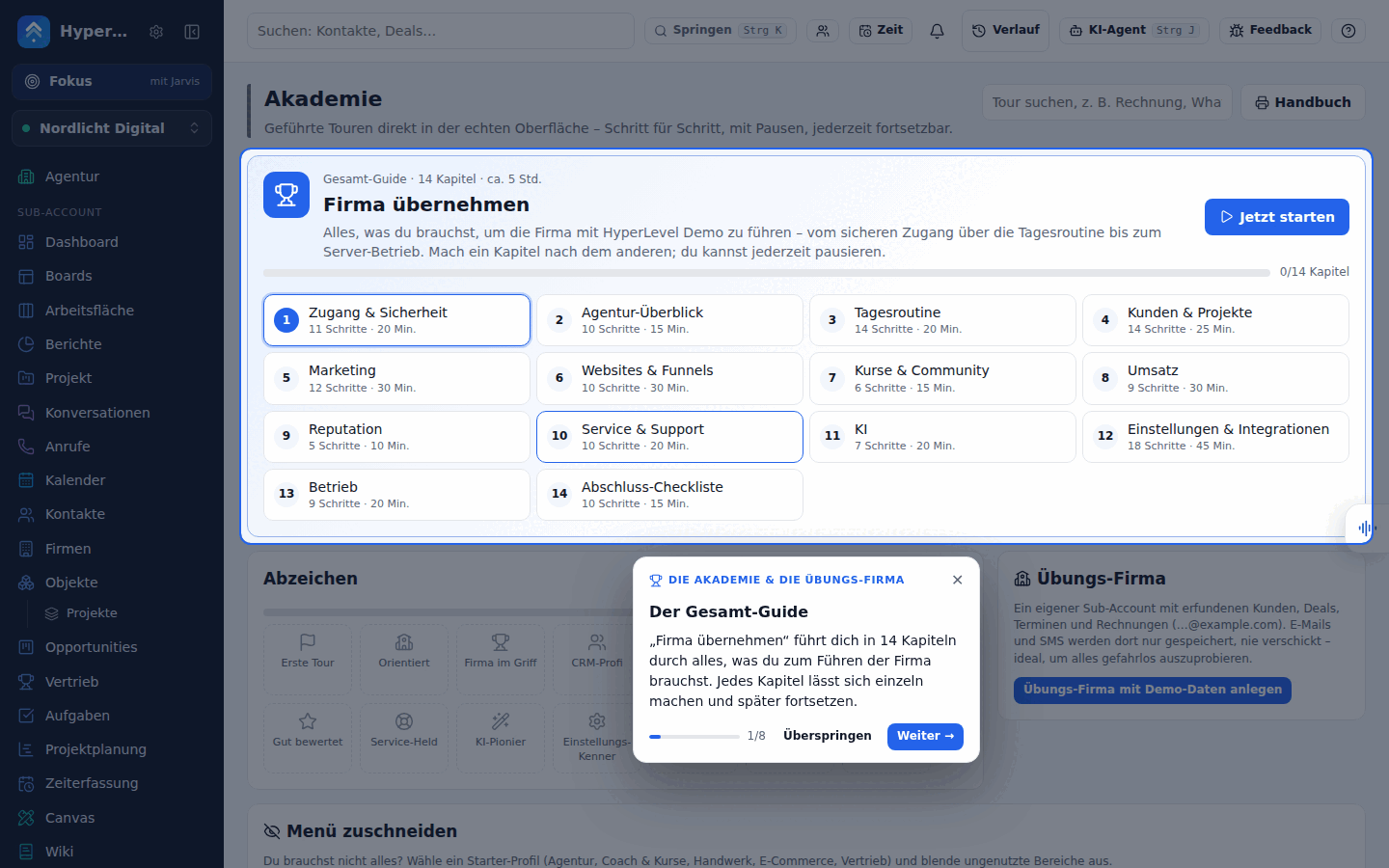
The Academy (menu item Academy, at the very bottom above Settings) teaches everyone how to run the company with the app – right in the real interface: the tour highlights the field or button, explains it in a sentence or two, tells you what to click or type, waits until you have done it (or you click “Next”), and moves on – across several pages if needed.
What is included
Section titled “What is included”- Complete guide “Take over the company” – 14 chapters for a successor, about five hours in total, each chapter on its own and resumable at any time: Access & security → Agency overview → Daily routine (with tickets and your own dashboard) → Customers & projects (with companies, custom objects and properties) → Marketing (with lead scoring and the marketing dashboard) → Websites & funnels → Courses & community → Revenue → Reputation → Service & support → AI → Settings & integrations (with the integrations catalog, Zapier/Make/n8n, HubSpot import and the Android app) → Operations → Final checklist.
- Course “Run your company with HyperLevel” – ten lessons for founders who run their own company with the app (company setup, sales, marketing, customer service, finance, projects & time, AI & automation, metrics & weekly routine, privacy & compliance, scaling), each with a 10-minute task in the real interface; its own group and badges in the Academy. Printed version: kurs-firma-fuehren.md (generated from
web/src/tour/content/company.tsviaweb/src/tour/company-course.ts), and the operating handbook that goes with it: company-playbook.md. - Module tours – more than 110 tours, one for every area with 5–15 steps, in ten groups: Getting started, Customers & daily business, Marketing, Websites & courses & community, Revenue, Reputation, Service & support, AI, Settings & channels, and Agency & operations. The full list with step count and duration is in the appendix of the handbook and in the Academy itself.
- “?” at the top right – on every page: the tours that fit exactly this page, “Continue” and the complete guide.
- Progress & badges – saved per person on the server: tours started, tours finished (✓), last step. If you reload the page, you are straight back in the running tour.
- Practice company (agency only) – a separate sub-account “Practice company (Academy)” with made-up contacts (and their companies), deals, tasks, an appointment, a form, a website, products, an invoice, a campaign, a workflow, two tickets, a help article, the custom object “Projects” with two records, association labels and a lead-scoring model (all e-mails
…@example.com). E-mail and SMS are set to “Save only” there – nothing is sent. Tours with exercises offer to switch there at the start. Create and delete it in the Academy; as long as you are inside, a yellow notice at the top tells you that everything is just practice. - Handover status (agency only) – what is set up and what is missing (e-mail/SMS sending, invoice details, channels, telephony, browser phone, AI assistant, AI phone agent, Stripe, Google, website chat, social planner, service – assignment, support mailbox, help center and open tickets without an assignee –, HubSpot move, white label, domains, OAuth, mailboxes, Supabase, Todoist, SaaS, backups, agency keys, Android app with paired phones), who has access (with 2FA status) and open items (admins without 2FA, missing required setup, websites that are down, overdue tasks). It reads from the existing status endpoints – passwords, tokens and keys are never shown.
- Handbook – the whole complete guide as a document (Academy → Handbook), for printing or “Save as PDF”. The same version is available as Markdown in handbuch.md.
- Guides in the app – at the end of every tour, “More on this” leads to the matching guide from
docs/, right in the app (signed in only; customer logins only see the guides without server details).
Getting started
Section titled “Getting started”The Academy is offered where you need it:
- Welcome card “Ready in 10 minutes – start the Academy” – on the home page (dashboard and agency overview) until the first tour (“Find your way around”) is done; in the demo always (all visitors share one login). ✕ hides it in this browser. New logins also see it at the top of the “What do you want to do?” dialog of simple mode – “Start the Academy” takes over the chosen goals and opens the tour.
- “Learn” / “Start tour” – in the empty views of the main areas (contacts, conversations, calendar, forms, websites & funnels, workflows, campaigns), in the page header of dashboard, agency and settings, and in the demo banner (“Start guided tour”). The link starts the tour that fits the page; if there is none, it opens the Academy.
- Help menu “?” – until the first tour is done, it shows “Learn: Ready in 10 minutes”.
- Menu – in simple mode, Academy is one of the fixed entries (next to dashboard, conversations, contacts, calendar, tasks).
Technically: web/src/tour/learn.tsx (small, loads the tour engine only on click; Empty has the prop learn for it) and web/src/tour/welcome.tsx.
Using the Academy
Section titled “Using the Academy”- Next / Back page through the tour, Skip jumps to the next chapter in the complete guide (otherwise it ends the tour), ✕ or Esc pauses – your progress is kept. If a dialog is open, Esc closes the dialog first.
- Steps with 👉 wait for you: for a click, an input, a page change or a success message (“Saved”). “Next” always works.
- Do it for me fills in an example in some steps (e.g. a name) – only for harmless inputs, never when sending or deleting.
- On a phone, the explanation appears as a bar at the bottom; the menu opens itself for the tour when needed.
- Customer logins only see tours and steps for the areas they may use; agency tours and steps only admins.
For developers
Section titled “For developers”-
Tours are plain data in
web/src/tour/content/*.ts(types inweb/src/tour/types.ts), the engine is inweb/src/tour/engine.tsx, the page inweb/src/pages/Academy.tsx, the server inserver/modules/academy.ts. -
A step points at an element via
data-tour="key"(onLink,Field,Stat,CheckandEmptyvia the proptour). Available automatically:nav-<route>(menu),tab-<key>(every tab),page-head/page-title/page-actions(page header),modal/modal-foot,search,jump,help,project-switcher,account. Only add attributes, never change the layout. -
Step kinds:
info,click(continues after a click on the element),navigate(to: route;to: 'forms/'= any subpage),fill(waits for a value; for a select list, for the option fromdemo.fill),wait(toast,appearorroute).routeopens the page before the step,optionalallows a missing element (thenmissingexplains),admin/permhide steps,demois “Do it for me”. -
tests/academy.test.tschecks that every target exists asdata-tourin the code, routes and tabs are real, guide links point to existing headings anddocs/handbuch.mdis up to date. Pages are allcase '…':inweb/src/main.tsx(also without a menu entry, e.g.properties). If chapters are renumbered, their IDs change – a migration inserver/modules/academy.tscarries the saved progress along (see002-journey-service-chapter). After changes to the complete guide, regenerate the handbook:node --import tsx -e "import('./web/src/tour/handbook.ts').then((m) => require('node:fs').writeFileSync('docs/handbuch.md', m.handbookMarkdown('HyperLevel')))"
| Method | Path | Purpose |
|---|---|---|
| GET | /api/academy |
Progress per tour, running tour, practice company |
| PUT | /api/academy/tours/:id |
{step, total, active?, done?} – save the position; active = running (continues after a reload) |
| DELETE | /api/academy/tours/:id |
Reset a tour |
| DELETE | /api/academy/active |
No tour is running any more |
| POST / DELETE | /api/academy/sandbox |
Create (with demo data) / delete the practice company – admins only |
| GET | /api/academy/docs, /api/academy/docs/:name |
Guides from docs/ (admins all, customer logins a selection) |